
Quick Review:
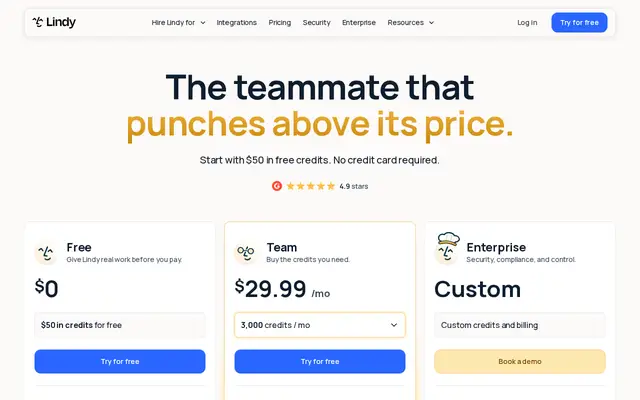
Lindy builds AI assistants that work across your email, calendar and other apps, for $29.99 per active user a month plus any credit top-ups.
- Best For
- Teams evaluating connected AI assistance.
- Skip It If
- Giving AI free rein over sensitive systems.
- Starting Price
- $29.99/active user/month plus top-upsChecked November 6, 2026.
Top 3 Pros
- Clear per-user pricing and included credits.
- A trial with credits and no card needed.
- Connected workflows can cut down on switching apps.
Top 3 Cons
- Seats and credit use both add to the cost.
- How teammates join affects billing.
- Wrong automated actions can be costly.

Deep Dive:
What It Is
An AI teammate service for email, calendar, meeting and connected-workflow assistance; this is Lindy at lindy.ai, not the unrelated business at lindy.com
How It Works
A sensible first workflow is to ask for a summary or proposed next step, inspect its source material and approve any consequential action yourself. Only after that works consistently should the team consider narrowly scoped automation. A polished response does not prove the assistant understood every attachment or business exception. Someone should review the connected systems, active seats and credit use alongside the productivity benefit.
Seen on Lindy’s own product pages, help center and documentation, read November 6, 2026 (listed under Sources). We haven’t used Lindy ourselves.
Key Features
- AI Teammate Workflows
- Email And Calendar Assistance
- Connected App Actions
- Team Credit Pooling
- Permission And Approval Configuration
Setup & Learning Curve
Choose one low-risk task and connect only the systems needed for that task. Define prohibited actions, approval points and who can change permissions. Use non-sensitive examples first, and check whether new teammates become billable through your chosen onboarding route. Document how to disconnect integrations and remove access. A pooled credit allowance can simplify allocation, but it also means an expensive workflow can consume resources needed by the rest of the team. Before Committing: Compare a proposed action with the original request, including recipients, dates and exceptions. Deliberately include an ambiguous request and check whether the system asks for clarification instead of acting. Track how many credits the complete workflow uses, not just one successful demonstration. This research did not involve an account, integration or live action.
Integrations
Lindy’s usefulness depends on the permissions granted to email, calendar and other connected applications. Connecting a service is a data-access decision, not just a convenience setting. Check read versus write access, authorization ownership and what happens when the responsible employee leaves. We did not connect a mailbox or authorize any external action.
Support
Public feedback is mixed: users describe useful automation, while other reports raise credit consumption, cancellation and support concerns. We do not turn those reports into a proven failure rate. The current official seat and credit explanations are more useful for budgeting than old third-party plan prices, which may describe an earlier version of the product.
Real-World Use Cases
- Preparing Suggested Email Responses For Human Review
- Summarizing Repetitive Internal Work
- Testing Narrowly Permissioned Team Assistance
What It Costs
$29.99/active user/month plus top-ups, checked November 6, 2026
Prices checked November 6, 2026, from Lindy’s own pricing page unless noted. Prices change often, so check the official page before you buy.
Check current pricing and plans on Lindy’s official site →
- Current official pricing is $29.99 per active user per month, including 3,000 monthly credits per active user pooled across the team. Credit top-ups are advertised at $10 per 1,000 credits. Monthly included credits do not roll over; top-up credits are described as non-expiring.
- The advertised free evaluation is $50 in credits for seven days without a credit card. Seat billing depends on how teammates join: new Slack teammates receive a seven-day seat trial, while direct sign-ups can be billed immediately and returning teammates do not receive another trial. Do not treat one trial invitation as a permanent free seat. Official facts checked November 6, 2026.
What We Like
- Clear per-user pricing and included credits.
- A trial with credits and no card needed.
- Connected workflows can cut down on switching apps.
What to Watch Out For
- Seats and credit use both add to the cost.
- How teammates join affects billing.
- Wrong automated actions can be costly.
The Fine Print
- Charges recur and purchases generally aren't refundable. Canceling ends renewal but doesn't refund unused time.
- Removing a seat takes effect at the end of its cycle, with no proration. Check your active teammates.
- The seven-day trial includes a set amount of credits.
Who It’s Best For
Teams Evaluating Connected AI Assistance.
- Teams that can decide what the AI assistant can access and what needs approval.
- Knowledge workers with repetitive email or calendar tasks.
Who Should Skip It
- Not for giving AI free rein over sensitive systems.
The Main Alternative
Notion Checked by Vetteroo
Notion, which we've also reviewed, organizes shared knowledge and work rather than acting across your apps. Choose based on whether you need to find information or take actions.
What it costs: Free plan; Plus $10/seat/mo billed yearly, checked October 26, 2026
Read our Notion review.
Is It Right for You?
Pick Lindy If You…
- have a narrow task and will keep a person in charge of important actions.
- will watch your seats and credit use.
Pick Notion If You…
- mainly need a shared workspace.
- want to organize your information before adding automation.
Our Take
Lindy builds AI assistants that work across your email, calendar and other apps, for $29.99 per active user a month plus any credit top-ups. Start with one simple task you can easily undo, and keep a person in charge of important actions.
Our review is a starting point, not the last word. Before you decide, see Lindy’s own plan details and terms on its official site.
Side by Side
| Company | Best for | Starting price | Trial / refund |
|---|---|---|---|
| Lindy Checked by Vetteroo | Teams Evaluating Connected AI Assistance | $29.99/active user/month plus top-ups | Seven-Day Credit Evaluation; Paid Purchases Non-Refundable |
| Notion Checked by Vetteroo | Individuals and teams who want notes, docs, wikis and projects in one flexible app | Free plan; Plus $10/seat/mo billed yearly, checked October 26, 2026 | Free plan |
Prices can change often. Check official pages for current prices.
What We Checked
- Lindy's pricing, product pages and terms, read November 6, 2026
- Lindy's Trustpilot profile, read November 6, 2026
- Notion's details: from our published review and its official pages, November 6, 2026
- The other official and outside pages listed under Sources (links checked November 6, 2026)
How We Researched
We researched Lindy's official pricing, terms, product pages, help pages and outside reviews. We haven't used Lindy ourselves, so this is a research-based review, not a hands-on test.
More in Software & AI Tools
See All Reviews →Or start with our Best Password Managers guide.
- Originality.ai Vetteroo Our Pick
- Proton Pass Vetteroo Our Pick
- 1Password Checked by Vetteroo
- Adalo Checked by Vetteroo
- Affilorama Checked by Vetteroo
- AI Magicx Checked by Vetteroo
- AnswerThis Checked by Vetteroo
- AnyRecover Checked by Vetteroo
Ready to Try Lindy?
- A trial with credits and no card needed
- $29.99/active user/month plus top-ups
Confirm the latest terms on the official site before you buy.
How We Review
We read the company's own terms, test the sign-up or booking steps where we can, and compare it with alternatives. A commission never changes what we write. Read our disclosure.