
Quick Review:
BankSync is an excellent feed layer for spreadsheet and AI workflows; Standard is the practical minimum if you need API or MCP, and Professional if you want AI cleanup.
- Best For
- People who want live bank feeds in Sheets, Notion or AI agents.
- Skip It If
- Someone who only wants a polished budgeting UI with goals and envelopes; PocketSmith fits that better.
- Starting Price
- Starter $4/month yearly; Standard $6/month yearlyChecked November 6, 2026.
- Free Plan or Trial
- Enterprise: custom (SSO, audit log, unlimited).
Top 3 Pros
- Very low entry price with real open-banking coverage claimed at 14,000+ banks.
- MCP access from Standard upward for AI agents.
- AI categorizer and merchant cleanup on Professional without burning Ask Penny credits.
Top 3 Cons
- Starter has weekly syncs only and no API/MCP.
- AI enrichments need Professional.
- Card is collected for the trial.
Affiliate link. How we get paid
What You’ll See on Their Site
Last Checked: 11/12/2026
Deep Dive:
What It Is
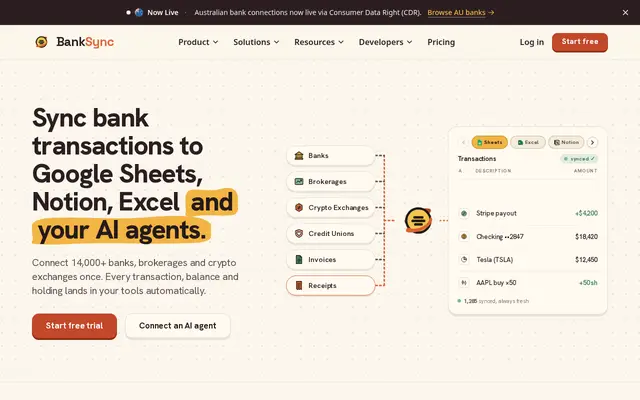
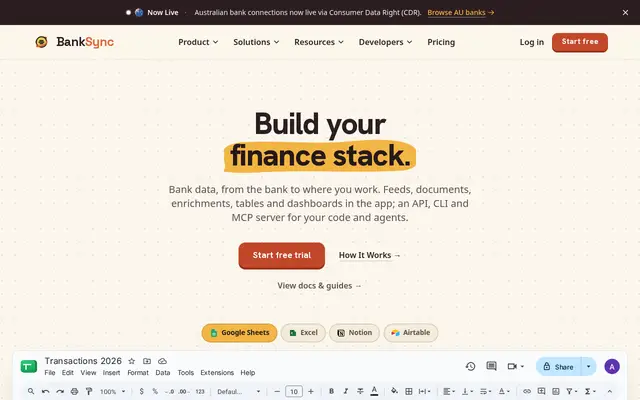
Bank and investment feed sync into Google Sheets, Notion, Airtable and Excel, with enrichments, document import and an MCP server for AI agents
How It Works
Connect a bank, pick Google Sheets or Notion as the destination, turn on enrichments, and optionally point an AI agent at the BankSync MCP server.
Seen on BankSync’s own product pages, help center and documentation, read November 6, 2026 (listed under Sources). We haven’t used BankSync ourselves.
Key Features
- 14,000+ bank connections
- Sync to Google Sheets, Notion, Airtable and Excel
- Document / receipt import
- Rules, budgets and anomaly enrichments
- AI categorizer and merchant cleanup (Professional+)
- REST API
- MCP server for AI agents
- Free advisor / multi-client tools
Setup & Learning Curve
Start the 14-day trial, connect a bank through the supported open-banking flow, and choose a destination.
Integrations
Google Sheets, Notion, Airtable, Excel; MCP at mcp.banksync.io; webhooks and API on higher plans.
Support
Email support; faster targets on Professional and above.
Real-World Use Cases
- Automatic bookkeeping sheets
- Client feed collection for accountants
- AI agent access to balances and transactions
- Investment account sync into Notion
What It Costs
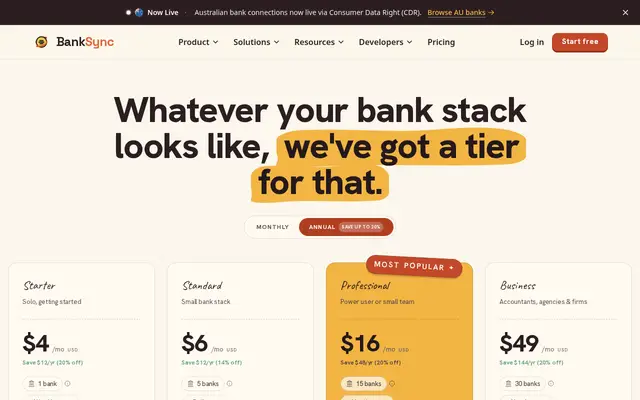
Starter $4/mo yearly; Standard $6/mo yearly, checked November 6, 2026
Prices checked November 6, 2026, from BankSync’s own pricing page unless noted. Prices change often, so check the official page before you buy.
Check current pricing and plans on BankSync’s official site → Affiliate link
- Starter: $4 a month billed yearly ($5 monthly); 1 bank; weekly syncs; 30 document imports a month; 2 tables / 25k rows; 5 of 16 enrichment types; no API/MCP.
- Standard: $6 a month billed yearly ($7 monthly); 5 banks; daily syncs; 100 docs; 5 tables / 100k rows; API 10 req/min; MCP 20 req/min; 14 of 16 enrichments.
- Professional: $16 a month billed yearly; 15 banks; hourly syncs; 1,000 docs; 25 tables / 500k rows; all 16 enrichments including AI categorizer and merchant cleanup; API 20 / MCP 40.
- Business: $49 a month billed yearly; 30 banks; 2,000 docs; 100 tables / 2M rows; API 30 / MCP 60; more seats.
- Enterprise: custom (SSO, audit log, unlimited). Annual saves up to 20%. 14-day free trial (card collected, not charged in trial). 7-day money-back after upgrade (official site, checked November 5, 2026).
Affiliate link. We may earn a commission at no extra cost to you. How we get paid
What We Like
- Very low entry price with real open-banking coverage claimed at 14,000+ banks.
- MCP access from Standard upward for AI agents.
- AI categorizer and merchant cleanup on Professional without burning Ask Penny credits.
- Advisor mode is free with unlimited clients.
What to Watch Out For
- Starter has weekly syncs only and no API/MCP.
- AI enrichments need Professional.
- Card is collected for the trial.
The Fine Print
- Extra banks on Professional/Business are about $2.50 a month each; extra seats about $4 a month.
- Historical data is up to about 2 years per connection, set by the bank.
- Cancel anytime; access lasts through the paid period.
- Good signs we found: detailed public pricing and FAQ, a documented MCP endpoint, and named open-banking style coverage when we checked.
Who It’s Best For
People who want live bank feeds in Sheets, Notion or AI agents.
- Freelancers and operators who live in Google Sheets or Notion and want automatic bank lines.
- Bookkeepers who collect client feeds (advisor tools are free; clients pay by default).
Who Should Skip It
- Not for someone who only wants a polished budgeting UI with goals and envelopes; PocketSmith fits that better.
The Main Alternative
PocketSmith Checked by Vetteroo
What it costs: Free; Foundation $9.99/mo yearly, checked October 28, 2026
Read our PocketSmith review.
Is It Right for You?
Pick BankSync If You…
- want bank lines inside Sheets, Notion, Airtable or Excel.
- need an MCP bank feed for AI agents.
Pick PocketSmith If You…
- want calendars, forecasts and budgeting tools more than raw feeds.
- prefer a consumer finance app over a sync utility.
Our Take
BankSync is an excellent feed layer for spreadsheet and AI workflows; Standard is the practical minimum if you need API or MCP, and Professional if you want AI cleanup.
Our review is a starting point, not the last word. Before you decide, see BankSync’s own plan details and terms on its official site. Affiliate link
Side by Side
| Company | Best for | Starting price | Trial / refund |
|---|---|---|---|
| BankSync Vetteroo Our Pick | People who want live bank feeds in Sheets, Notion or AI agents | Starter $4/mo yearly; Standard $6/mo yearly See Price (affiliate link) | 14-day free trial; 7-day money-back |
| PocketSmith Checked by Vetteroo | Planners who want long-range cash flow forecasts and calendar budgeting | Free; Foundation $9.99/mo yearly, checked October 28, 2026 See Price (affiliate link) | Free plan; full refund within 14 days |
Prices can change often. Check official pages for current prices.
What We Checked
- BankSync's pricing, product pages and terms, read November 6, 2026
- Trustpilot, searched November 6, 2026 (no usable score for BankSync)
- PocketSmith's details: from our published review and its official pages, November 6, 2026
- The other official and outside pages listed under Sources (links checked November 6, 2026)
How We Researched
We researched BankSync's official pricing, terms, product pages, help pages and outside reviews. We haven't used BankSync ourselves, so this is a research-based review, not a hands-on test.
Sources
More in Budgeting Apps
See All Reviews →Or start with our Best Budgeting Apps guide.
- Empower Checked by Vetteroo
- Lunch Money Checked by Vetteroo
- Monarch Checked by Vetteroo
- PocketGuard Checked by Vetteroo
- PocketSmith Checked by Vetteroo
- Tiller Checked by Vetteroo
- YNAB Checked by Vetteroo
Ready to Try BankSync?
- 14-day free trial
- Starter $4/mo yearly; Standard $6/mo yearly
Confirm the latest terms on the official site before you buy.
Affiliate link. We may earn a commission at no extra cost to you. How we get paid
How We Review
We read the company's own terms, test the sign-up or booking steps where we can, and compare it with alternatives. A commission never changes what we write. Read our disclosure.