
Quick Review:
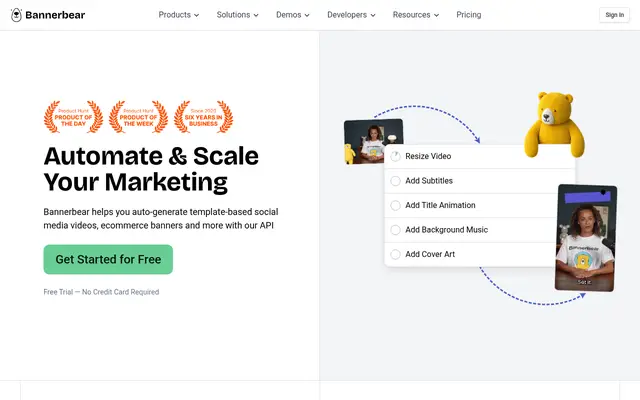
Bannerbear automatically creates images and videos from templates and data, with the Automate plan at $49 a month. It's a great fit for repeated visuals like event cards or listing graphics.
- Best For
- Repeatable template-based visual asset generation.
- Skip It If
- One-off designs that each need creative direction.
- Starting Price
- Automate $49/month with stated credit allowancesChecked November 7, 2026.
- Free Plan or Trial
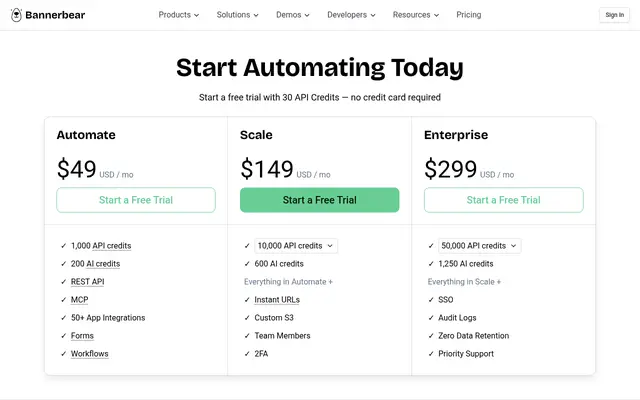
- The free trial needs no card and includes 30 API credits, with smaller workspace, template and workflow limits.
Top 3 Pros
- Clear pricing, with API and AI credit allowances listed separately.
- The FAQ explains how format, size, animation and steps affect usage.
- Templates and an API suit repeated assets well.
Top 3 Cons
- Credit use depends on your settings; the allowance isn't a set number of finished images.
- You still need design judgment, data checks and rights clearance.
- Security, retention and team features depend on your plan.
Deep Dive:
What It Is
an image, PDF, animation and video-generation service that renders reusable templates through APIs, forms, workflows and integrations
How It Works
Imagine a company publishing a series of event announcements with the same brand layout but different dates, speakers and photographs. The useful evaluation would render a short title, an unusually long title and an absent photograph, then check every output format. A second test should deliberately fail a source-data field and inspect how the workflow records the error and credit use. These are suggested evaluation cases, not evidence that we ran the API, generated an image or measured a productivity gain.
Seen on Bannerbear’s own product pages, help center and documentation, read November 7, 2026 (listed under Sources). We haven’t used Bannerbear ourselves.
Key Features
- Template-based rendering is useful when repeated layouts can be separated from changing data. A person still needs to design the template and define safe fallbacks. Consistency is an operational possibility, not proof that every generated asset will be readable or brand-compliant.
- The pricing lists a REST API, forms, workflows and many app integrations. Those are different ways to initiate output, not a promise that every existing internal tool is already connected. A business should identify who maintains field mapping, authentication and failure handling.
- Animations, video operations and multi-step workflows consume credits according to their work. The FAQ describes workflows as the sum of their steps rather than one fixed-cost action. An image-count estimate should not be applied to a video pipeline without a representative usage calculation.
- Higher tiers describe features such as custom storage, team access, single sign-on, audit logs and zero data retention. Those are tier-dependent claims, not included guarantees for Automate. Verify the actual selected tier and data flow if media is sensitive or a security agreement is required.
Setup & Learning Curve
Start with one representative layout and a structured set of non-sensitive sample records. Identify the owner of the template, the source of each field and the independent destination for finished files. Plan checks for text overflow, image cropping, wrong dates and repeated requests before connecting production data. Record expected credits by operation and decide what happens if the allowance is exhausted. No API key, account, integration, render, payment or production automation was created for this research. Before Committing: Match the intended output formats and steps to the current credit rules rather than assuming one finished campaign equals one credit. Confirm the selected allowance, any AI top-ups and tier-dependent retention controls. Keep originals and a recoverable copy of template inputs outside the service. Review fonts, photographs, logos and other asset licenses before publishing output.
Integrations
The service describes API access and connections to workflow tools, with keys scoped to workspaces according to the pricing FAQ. Workspace separation can support client or project boundaries, but it is not a substitute for secure key handling or a tested access policy. A developer should ensure that retries do not create unexpected duplicate work and that failures are visible to a human owner. We did not inspect credentials, call an API or test whether a named third-party integration meets a specific business requirement.
Support
The official site links to help documentation and support, while the Enterprise card includes priority support. That does not establish an enterprise response commitment for every monthly plan. The public terms are dated June 29, 2021 and remain the contract linked from the current pricing page; an older revision date is a fact, not proof that the service is abandoned or fake. No support message was sent and no private service-level agreement was obtained.
Real-World Use Cases
- A marketing team producing recurring event or product cards from an approved template and structured data, with human review before publication.
- An agency comparing workspace separation, output storage and team permissions for repeated client assets rather than one-off design projects.
- A developer evaluating a controlled image or document pipeline with explicit credit monitoring, error handling and independent copies of source material.
What It Costs
Automate $49/Month With Stated Credit Allowances, checked November 7, 2026
Prices checked November 7, 2026, from Bannerbear’s own pricing page unless noted. Prices change often, so check the official page before you buy.
Check current pricing and plans on Bannerbear’s official site →
- Automate is $49 a month with 1,000 API credits and 200 AI credits (checked November 6, 2026). Scale starts at $149 a month with 10,000 API credits and 600 AI credits, and Enterprise starts at $299 with 50,000 API credits and 1,250 AI credits.
- Plans are billed in advance each month and renew automatically.
- A basic image render costs one credit, depending on format and size. Animation, video and workflows cost more, and AI features use AI credits.
- The free trial needs no card and includes 30 API credits, with smaller workspace, template and workflow limits.
What We Like
- Clear pricing, with API and AI credit allowances listed separately.
- The FAQ explains how format, size, animation and steps affect usage.
- Templates and an API suit repeated assets well.
What to Watch Out For
- Credit use depends on your settings; the allowance isn't a set number of finished images.
- You still need design judgment, data checks and rights clearance.
- Security, retention and team features depend on your plan.
The Fine Print
- Subscriptions are billed in advance and renew automatically unless canceled; you can cancel in account settings.
- Canceling keeps access through the end of the current period without refunding fees already paid.
- Paid fees generally aren't refundable.
Who It’s Best For
Repeatable Template-Based Visual Asset Generation.
- Businesses that repeatedly create visuals from changing data, like event cards, listing graphics or announcements.
- Teams with someone to manage the data, integration and output checks.
Who Should Skip It
- Not for one-off designs that each need creative direction.
The Main Alternative
AdCreative.ai
AdCreative.ai, which we've also reviewed, generates ad concepts rather than filling in templates with data. Compare who designs the layout, how usage is metered and who checks rights.
What it costs: No New Competitor Price Quoted
Is It Right for You?
Pick Bannerbear If You…
- your visuals can be templated and the usage fits your budget.
- someone can maintain the data, integration and output review.
Pick AdCreative.ai If You…
- each asset needs creative direction.
- you can't manage the technical integration and credits.
Our Take
Bannerbear automatically creates images and videos from templates and data, with the Automate plan at $49 a month. It's a great fit for repeated visuals like event cards or listing graphics. Usage is metered in credits, and fees generally aren't refundable.
Our review is a starting point, not the last word. Before you decide, see Bannerbear’s own plan details and terms on its official site.
Side by Side
| Company | Best for | Starting price | Trial / refund |
|---|---|---|---|
| Bannerbear Checked by Vetteroo | Repeatable Template-Based Visual Asset Generation | Automate $49/Month With Stated Credit Allowances | Generally Nonrefundable; Cancel Renewal Through Settings Or Support |
| AdCreative.ai | Compare The Specific Workflow; Not An Identical Product | No New Competitor Price Quoted | Read The Applicable Current Product Terms |
Prices can change often. Check official pages for current prices.
What We Checked
- Bannerbear's pricing, product pages and terms, read November 7, 2026
- Trustpilot, searched November 7, 2026 (no usable score for Bannerbear)
- AdCreative.ai's details: read on its official pages on November 7, 2026 (comparison only; not reviewed)
- The other official and outside pages listed under Sources (links checked November 7, 2026)
How We Researched
We researched Bannerbear's official pricing, terms, product pages, help pages and outside reviews. We haven't used Bannerbear ourselves, so this is a research-based review, not a hands-on test.
More in Design Tools
See All Reviews →- Mockplus Vetteroo Our Pick
- Vectorizer.AI Vetteroo Our Pick
- Architect Render Checked by Vetteroo
- ArtSmart AI Checked by Vetteroo
- Boords Checked by Vetteroo
- BrandDad Checked by Vetteroo
- Claritee Checked by Vetteroo
- ComfyUI Checked by Vetteroo
Ready to Try Bannerbear?
- Automate $49/Month With Stated Credit Allowances
How We Review
We read the company's own terms, test the sign-up or booking steps where we can, and compare it with alternatives. A commission never changes what we write. Read our disclosure.