
Quick Review:
BuildShip is a visual tool for building backends and workflows, with Starter at $225 a year. It can simplify a small integration, but you still need to handle security, logging and failures. Payments generally aren't refundable.
- Best For
- Developers building visual backend workflows.
- Skip It If
- Anyone assuming a visual prototype is secure and production-ready.
- Starting Price
- $225/year (Starter)Checked November 6, 2026.
Top 3 Pros
- Clear yearly prices.
- Visual flows make small integrations easier to follow.
- Add-on costs are listed separately.
Top 3 Cons
- Outside service charges and retries add to the cost.
- Production use needs security, logging and recovery planning.
- Test reliability before relying on it.
Deep Dive:
What It Is
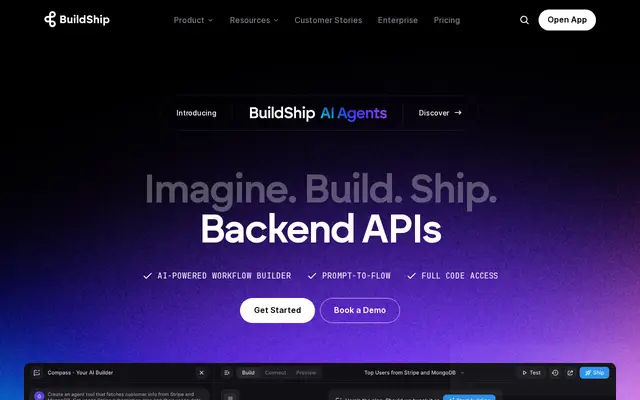
A visual backend and workflow-building platform for connecting APIs, data and AI services into application logic
How It Works
A practical workflow begins with an input, a sequence of bounded operations and an expected output. The builder should inspect what happens when a connected API times out, returns malformed data or charges for a retry. During operation, logs, usage and failed runs matter as much as the visual diagram. A flow that works once with sample data has not yet demonstrated safe behavior with real users.
Seen on BuildShip’s own product pages, help center and documentation, read November 6, 2026 (listed under Sources). We haven’t used BuildShip ourselves.
Key Features
- Visual Backend Workflows
- API And Service Connections
- AI-Oriented Nodes
- Credit-Based Runtime Plans
- Optional Production Add-Ons
Setup & Learning Curve
Build a small non-production workflow with synthetic or public data. Define who may invoke it and which connected services it may access. Store credentials through the product’s approved mechanism and keep them out of logs or shared examples. Test retries, duplicate events and failure paths before connecting money movement, messaging or other consequential actions. Keep the flow specification and a recovery plan outside the service. Before Committing: Use an endpoint with a valid request, an unauthorized request and a simulated upstream failure. Check duplicate-event behavior, logging redaction and the cost of retries. Confirm how to pause the workflow and recover configuration. No endpoint, account, API call or production deployment was created during this review.
Integrations
Each API or model connection introduces separate authentication, rate limits, usage costs and data terms. Bring-your-own-key control does not make external usage free. Verify the actual node behavior and supported version rather than assuming a connector logo establishes every capability. We did not obtain credentials or connect a live account.
Support
Public feedback raises bugs, downtime, migration handling, logging and support consistency. We have not reproduced those issues or measured an availability rate. They make an observable test workflow and a fallback plan important for production evaluation. A visual interface can simplify development while still requiring an operator who understands errors and billing.
Real-World Use Cases
- Prototyping A Small Backend Endpoint
- Connecting Approved Data And API Steps
- Evaluating An AI Workflow Before Production
What It Costs
$225/year (Starter), checked November 6, 2026
Prices checked November 6, 2026, from BuildShip’s own pricing page unless noted. Prices change often, so check the official page before you buy.
Check current pricing and plans on BuildShip’s official site →
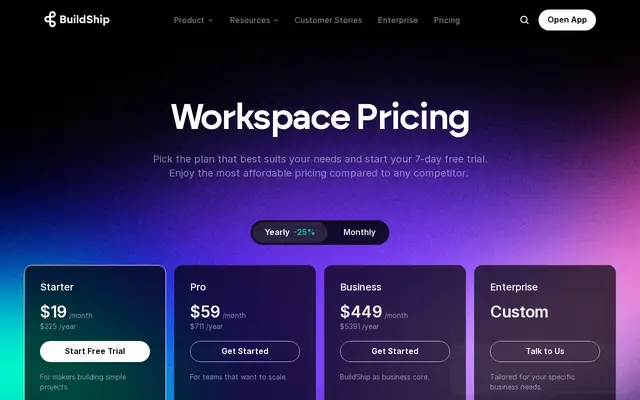
- The official annual display explicitly lists Starter at $225 per year, Pro at $711 per year and Business at $5,391 per year. Their rounded monthly equivalents are $19, $59 and $449, but those rounded figures are not independent monthly invoices. These are USD prices under the terms.
- The displayed plans include 20,000, 100,000 and 300,000 monthly credits respectively. The page also lists a 100,000-credit top-up for $10, custom domains at $80 per year and a no-cold-start option at $29 per month or $300 per year. External model or API charges can be separate. A seven-day trial is advertised, not a general paid refund guarantee. Official facts checked November 6, 2026.
What We Like
- Clear yearly prices.
- Visual flows make small integrations easier to follow.
- Add-on costs are listed separately.
What to Watch Out For
- Outside service charges and retries add to the cost.
- Production use needs security, logging and recovery planning.
- Test reliability before relying on it.
The Fine Print
- Subscriptions are billed in U.S. dollars, renew automatically and generally aren't refundable.
- Canceling takes effect at the end of the paid term.
- There's a seven-day trial. Extra 100,000-credit top-ups are $10, and custom domains are $80 a year.
Who It’s Best For
Developers Building Visual Backend Workflows.
- Developers who can check permissions and how things fail.
- Teams connecting several services into a workflow.
Who Should Skip It
- Not for anyone assuming a visual prototype is secure and production-ready.
The Main Alternative
n8n Checked by Vetteroo
n8n, which we've also reviewed, is another workflow automation tool, available hosted or self-managed. Compare the workflow, services, execution and maintenance effort.
What it costs: Free self-hosted; Cloud from €20/mo billed yearly, checked October 29, 2026
Read our n8n review.
Is It Right for You?
Pick BuildShip If You…
- want to build backends visually and will test safeguards.
- can budget for the plan, add-ons and outside usage.
Pick n8n If You…
- prefer its automation style and can run it safely.
- need a different kind of integration.
Our Take
BuildShip is a visual tool for building backends and workflows, with Starter at $225 a year. It can simplify a small integration, but you still need to handle security, logging and failures. Payments generally aren't refundable.
Our review is a starting point, not the last word. Before you decide, see BuildShip’s own plan details and terms on its official site.
Side by Side
| Company | Best for | Starting price | Trial / refund |
|---|---|---|---|
| BuildShip Checked by Vetteroo | Developers Building Visual Backend Workflows | $225/year (Starter) | Seven-Day Trial; Paid Fees Generally Non-Refundable |
| n8n Checked by Vetteroo | Technical teams that want flexible automation or a self-hosted option | Free self-hosted; Cloud from €20/mo billed yearly, checked October 29, 2026 | Free trial on cloud |
Prices can change often. Check official pages for current prices.
What We Checked
- BuildShip's pricing, product pages and terms, read November 6, 2026
- Trustpilot, searched November 6, 2026 (no usable score for BuildShip)
- n8n's details: from our published review and its official pages, November 6, 2026
- The other official and outside pages listed under Sources (links checked November 6, 2026)
How We Researched
We researched BuildShip's official pricing, terms, product pages, help pages and outside reviews. We haven't used BuildShip ourselves, so this is a research-based review, not a hands-on test.
More in Developer & IT Tools
See All Reviews →Ready to Try BuildShip?
- $225/year (Starter)
Confirm the latest terms on the official site before you buy.
How We Review
We read the company's own terms, test the sign-up or booking steps where we can, and compare it with alternatives. A commission never changes what we write. Read our disclosure.