
Quick Review:
Docsie is a strong pick for teams whose know-how lives in recordings; start free and watch how many credits your videos use before buying a yearly plan.
- Best For
- Teams turning training videos and files into help docs.
- Skip It If
- Someone who only needs a simple wiki; the credit system takes some learning.
- Starting Price
- Free; Hobby $25/month billed yearlyChecked November 5, 2026.
- Free Plan or Trial
- Free plan with no credit card, plus a pay-once option for a single video.
Top 2 Pros
- Turns videos, PDFs and websites into editable guides, then publishes them as a help portal or course.
- Readers of public portals are free; you only pay for people who create or edit content.
Top 3 Cons
- Everything runs on AI credits, and monthly credits don’t roll over, so heavy video use can cost more than the plan price suggests.
- Connectors for Confluence, GitHub, Slack, Jira and Zendesk start on the $249-a-month Business plan.
- Some reviewers mention a learning curve for advanced features and the lack of a desktop or mobile app; a few AppSumo buyers reported weak support.
Affiliate link. How we get paid
Deep Dive:
What It Is
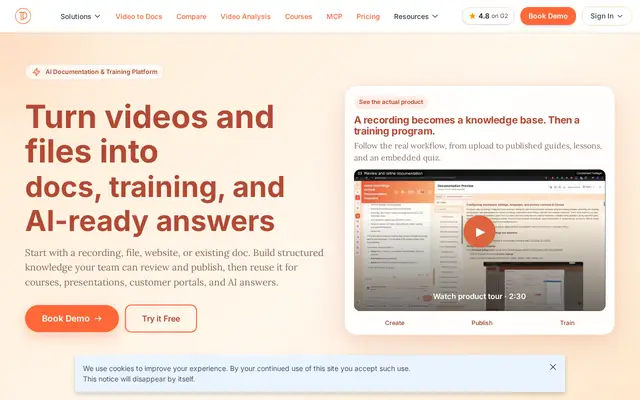
Documentation and knowledge base software that turns screen recordings, videos, PDFs and websites into step-by-step guides, help portals, training courses and an AI chatbot grounded in your docs
How It Works
Upload a Zoom or Loom recording, let Docsie write the step-by-step guide, edit and approve it, then publish it to your help portal or turn it into a short course.
Seen on Docsie’s own product pages, help center and documentation, read November 5, 2026 (listed under Sources). We haven’t used Docsie ourselves.
Key Features
- Video to docs
- Knowledge base portals
- AI chatbot on your docs
- Training courses with certificates
- Translation into 100+ languages
- Version control
- Free screen recorder
Setup & Learning Curve
Sign up free with a work email; no credit card needed.
Integrations
Support
Help docs on every plan; support tickets from Premium; dedicated training on Enterprise.
Real-World Use Cases
- Customer help centers
- Employee onboarding guides
- SOPs from screen recordings
- Product documentation
What It Costs
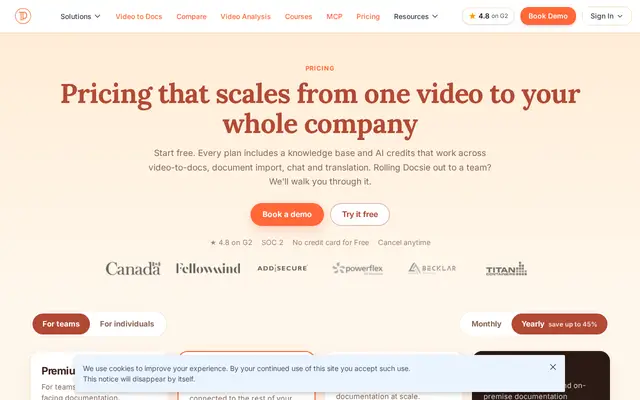
Free; Hobby $25/mo billed yearly, checked November 5, 2026
Prices checked November 5, 2026, from Docsie’s own pricing page unless noted. Prices change often, so check the official page before you buy.
Check current pricing and plans on Docsie’s official site → Affiliate link
- Free: $0 forever, no card needed; 12,500 AI credits at signup, 5 free video uploads, a knowledge base on your own domain, 1 seat and 3 GB storage.
- Hobby: $25 a month billed yearly ($290 a year); 60,000 AI credits a month (about 2 hours of video), 1 seat.
- Starter: $83 a month billed yearly ($990 a year); 150,000 AI credits a month (about 5 hours of video), 5 seats.
- Premium: $170 a month billed yearly ($2,040 a year); 500,000 AI credits a month, 15 seats (+$10 a seat), custom branding, AI chatbots and support tickets.
- Business: $249 a month billed yearly ($2,988 a year); Organization: $699 a month billed yearly ($8,388 a year); Enterprise: custom quote.
- One video without a plan: the first two guides are free to read, then $12.99 to $69 to unlock the full file, depending on length (official site, checked November 4, 2026).
Affiliate link. We may earn a commission at no extra cost to you. How we get paid
What We Like
- Free plan with no credit card, plus a pay-once option for a single video.
- Turns videos, PDFs and websites into editable guides, then publishes them as a help portal or course.
- Readers of public portals are free; you only pay for people who create or edit content.
- Rated about 4.8/5 on G2 and 4.7/5 on Capterra by reviewers who praise ease of use, translation and versioning.
What to Watch Out For
- Everything runs on AI credits, and monthly credits don’t roll over, so heavy video use can cost more than the plan price suggests.
- Connectors for Confluence, GitHub, Slack, Jira and Zendesk start on the $249-a-month Business plan.
- Some reviewers mention a learning curve for advanced features and the lack of a desktop or mobile app; a few AppSumo buyers reported weak support.
The Fine Print
- The prices shown are the yearly plans, paid up front; yearly billing saves 17% to 45% depending on the plan.
- You can upgrade, downgrade or cancel at any time. We didn’t find a refund policy on its pricing page, so ask before paying for a year.
- Credits you buy separately never expire and are used after your monthly credits.
- Registered nonprofits get discounts on paid plans.
- Prices are in USD.
- Legitimacy signals we found: published pricing with a full plan comparison, SOC 2 noted on its pricing page, and independent ratings of about 4.8/5 on G2 (100+ reviews) and 4.7/5 on Capterra (22 reviews) when we checked.
Who It’s Best For
Teams turning training videos and files into help docs.
- Support, training and product teams that record walkthroughs and want written guides from them.
- Small businesses that want a public help center or customer portal on their own domain.
Who Should Skip It
- Not for someone who only needs a simple wiki; the credit system takes some learning.
The Main Alternative
Document360 Checked by Vetteroo
Document360 is knowledge base software for help centers and internal docs, priced by quote after a demo with a 14-day free trial.
What it costs: Quote-based
Read our Document360 review.
Is It Right for You?
Pick Docsie If You…
- want to turn recorded videos into written guides automatically.
- want a free plan and published prices.
Pick Document360 If You…
- mainly write help articles by hand.
- want a sales-led setup with a demo.
Our Take
Docsie is a strong pick for teams whose know-how lives in recordings; start free and watch how many credits your videos use before buying a yearly plan.
Our review is a starting point, not the last word. Before you decide, see Docsie’s own plan details and terms on its official site. Affiliate link
Side by Side
| Company | Best for | Starting price | Trial / refund |
|---|---|---|---|
| Docsie Checked by Vetteroo | Teams turning training videos and files into help docs | Free; Hobby $25/mo billed yearly See Price (affiliate link) | Free plan, no card |
| Document360 Checked by Vetteroo | Support and product teams | Quote-based | 14-day trial |
Prices can change often. Check official pages for current prices.
What We Checked
- Docsie's pricing, product pages and terms, read November 5, 2026
- Trustpilot, searched November 5, 2026 (no usable score for Docsie)
- Document360's details: from our published review and its official pages, November 5, 2026
- The other official and outside pages listed under Sources (links checked November 5, 2026)
How We Researched
We researched Docsie's official pricing, terms, product pages, help pages and outside reviews. We haven't used Docsie ourselves, so this is a research-based review, not a hands-on test.
More in Customer Support Software
See All Reviews →- Collect.chat Vetteroo Our Pick
- Provide Support Vetteroo Our Pick
- BoldDesk Checked by Vetteroo
- BotPenguin Checked by Vetteroo
- Botpress Checked by Vetteroo
- Calilio Checked by Vetteroo
- Canny Checked by Vetteroo
- Chaport Checked by Vetteroo
Ready to Try Docsie?
- Free; Hobby $25/mo billed yearly
Confirm the latest terms on the official site before you buy.
Affiliate link. We may earn a commission at no extra cost to you. How we get paid
How We Review
We read the company's own terms, test the sign-up or booking steps where we can, and compare it with alternatives. A commission never changes what we write. Read our disclosure.