
Quick Review:
Flixier is a fast, easy browser editor for regular creators, especially on a yearly plan; test long projects on the free plan first.
- Best For
- Creators and teams who want to edit video in a browser.
- Skip It If
- Long, heavy projects on a low-memory computer; some reviewers report export failures there.
- Starting Price
- Free; Starter $19/seat/month ($108/year)Checked November 5, 2026.
- Free Plan or Trial
- Free plan with no credit card.
Top 3 Pros
- Works in the browser, and cloud rendering means exports don’t depend on your computer’s power.
- Paying yearly costs a little over half the monthly price.
- Reviewers on Capterra, G2 and Trustpilot often praise how easy and fast it is.
Top 3 Cons
- The free plan has a watermark and only 720p exports.
- Starter is capped at 60 minutes of export a month.
- On Trustpilot, some reviewers report failed exports on long videos and slow technical support.
Affiliate link. How we get paid
Deep Dive:
What It Is
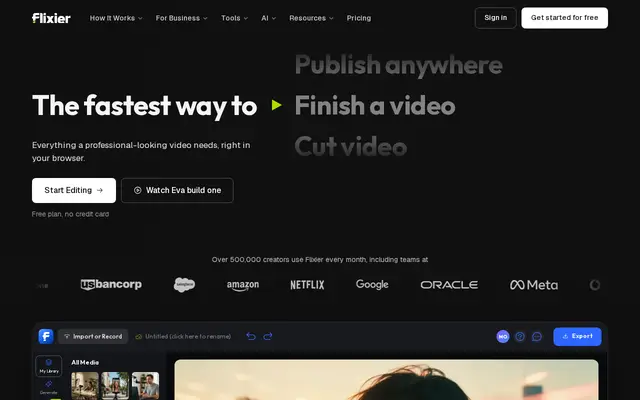
Browser-based video editor with cloud rendering, screen and webcam recording, automatic subtitles, edit-by-transcript and AI video generation inside the timeline
How It Works
Upload or record your footage, trim it on the timeline or by editing the transcript, add subtitles, and export in the cloud while you keep working.
Seen on Flixier’s own product pages, help center and documentation, read November 5, 2026 (listed under Sources). We haven’t used Flixier ourselves.
Key Features
- Browser video editor
- Cloud rendering
- Screen and webcam recording
- Automatic subtitles
- Edit by transcript
- AI video generation
- Brand kit
- Team comments
Setup & Learning Curve
Sign up free in the browser; no download or credit card needed.
Integrations
Publish to YouTube, TikTok and other platforms from the editor.
Support
Help center and chat; priority chat on Business.
Real-World Use Cases
- YouTube tutorials
- Social media clips
- Training and onboarding videos
- Product demos
What It Costs
Free; Starter $19/seat/mo ($108/yr), checked November 5, 2026
Prices checked November 5, 2026, from Flixier’s own pricing page unless noted. Prices change often, so check the official page before you buy.
Check current pricing and plans on Flixier’s official site → Affiliate link
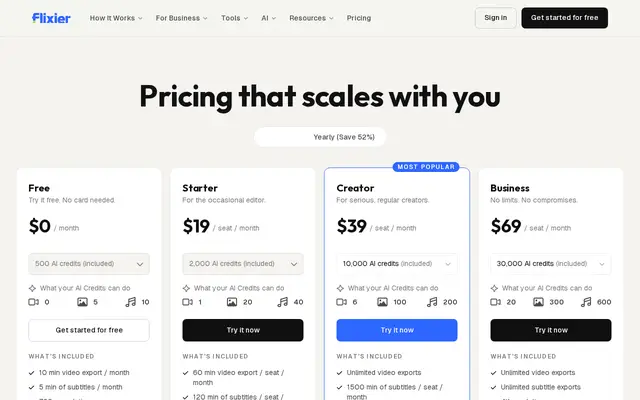
- Free: $0, no card needed; 10 minutes of video export a month, 720p, 2 GB storage, 500 AI credits and a Flixier watermark.
- Starter: $19 per seat a month, or $108 per seat a year; 60 minutes of export a month, 1080p, 20 GB storage, no watermark.
- Creator: $39 per seat a month, or $216 per seat a year; unlimited exports, 4K, 250 GB storage, 10,000 AI credits, edit by transcript and brand kit.
- Business: $69 per seat a month, or $372 per seat a year; unlimited storage and subtitle exports, plus priority chat support.
- Extra AI credits: $10 a month or $96 a year for 50,000 credits, on Creator and Business only (official site, checked November 4, 2026).
Affiliate link. We may earn a commission at no extra cost to you. How we get paid
What We Like
- Works in the browser, and cloud rendering means exports don’t depend on your computer’s power.
- Free plan with no credit card.
- Paying yearly costs a little over half the monthly price.
- Reviewers on Capterra, G2 and Trustpilot often praise how easy and fast it is.
What to Watch Out For
- The free plan has a watermark and only 720p exports.
- Starter is capped at 60 minutes of export a month.
- On Trustpilot, some reviewers report failed exports on long videos and slow technical support.
The Fine Print
- You can cancel anytime; the plan stays active until the end of the billing period.
- Full refund only if you haven’t used the service and you’re within 14 days of subscribing; after that, fees aren’t refundable.
- Unused AI credits and extra credit purchases follow the plan’s own rules; extra credits are only sold on Creator and Business.
- Prices are in USD.
- Legitimacy signals we found: published pricing and refund terms, and independent ratings of about 4.7/5 on Capterra (31 reviews), 4.5/5 on G2 and 4.0/5 on Trustpilot (254 reviews) when we checked.
Who It’s Best For
Creators and teams who want to edit video in a browser.
- Creators, teachers and marketing teams who make short videos, tutorials and social clips.
- People with slower computers, since rendering happens in the cloud.
Who Should Skip It
- Not for long, heavy projects on a low-memory computer; some reviewers report export failures there.
The Main Alternative
Is It Right for You?
Pick Flixier If You…
- want unlimited exports and 4K on the Creator plan.
- want AI video clips generated right inside the timeline.
Pick VEED If You…
- want a cheaper entry plan.
- mostly make quick social clips with templates.
Our Take
Flixier is a fast, easy browser editor for regular creators, especially on a yearly plan; test long projects on the free plan first.
Our review is a starting point, not the last word. Before you decide, see Flixier’s own plan details and terms on its official site. Affiliate link
Side by Side
| Company | Best for | Starting price | Trial / refund |
|---|---|---|---|
| Flixier Checked by Vetteroo | Creators and teams who want to edit video in a browser | Free; Starter $19/seat/mo ($108/yr) See Price (affiliate link) | Free plan, no card |
| VEED Checked by Vetteroo | Creators and teams who want to edit videos, add subtitles and record in a browser | Free plan; Creator $12/user/mo billed annually, checked October 26, 2026 | Free plan; trial on Enterprise only |
Prices can change often. Check official pages for current prices.
What We Checked
- Flixier's pricing, product pages and terms, read November 5, 2026
- Flixier's Trustpilot profile, read November 5, 2026
- VEED's details: from our published review and its official pages, November 5, 2026
- The other official and outside pages listed under Sources (links checked November 5, 2026)
How We Researched
We researched Flixier's official pricing, terms, product pages, help pages and outside reviews. We haven't used Flixier ourselves, so this is a research-based review, not a hands-on test.
More in Photo & Video Editing
See All Reviews →Or start with our Best AI Video Generators guide.
Ready to Try Flixier?
- Free plan with no credit card
- Free; Starter $19/seat/mo ($108/yr)
Confirm the latest terms on the official site before you buy.
Affiliate link. We may earn a commission at no extra cost to you. How we get paid
How We Review
We read the company's own terms, test the sign-up or booking steps where we can, and compare it with alternatives. A commission never changes what we write. Read our disclosure.