
Quick Review:
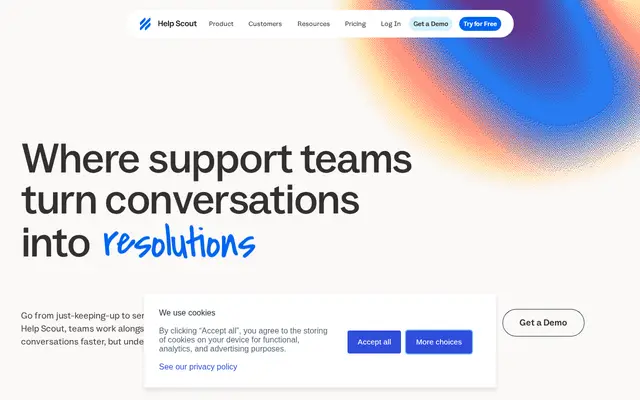
Help Scout is a well-designed shared inbox and help center for support teams, with clear pricing and a 30-day money-back guarantee on your first payment.
- Best For
- Shared inbox and public Help center teams.
- Skip It If
- Teams that need a complex IT service desk or broad multi-channel routing.
- Starting Price
- $25/user/month equivalent; annual StandardChecked November 7, 2026.
- Free Plan or Trial
- Standard and Plus come with a 15-day trial with no card needed, and new accounts get a three-month AI trial.
Top 3 Pros
- Pricing is clear, and the billing guide explains what you pay for.
- A 30-day money-back guarantee on your first payment, monthly or yearly.
- The docs explain per-user billing, AI resolutions and extra capacity before you sign up.
Top 3 Cons
- Listed prices are per user per month billed yearly, and Pro has a minimum number of users.
- Help Scout can use de-identified data to train models unless you ask to opt out.
- Canceling can deactivate your account but still leave you owing the full term.
Deep Dive:
What It Is
shared customer-support inboxes, Docs knowledge bases, Beacon widgets and optional AI-assisted service tools
How It Works
Imagine a three-person online retailer where one person handles delivery questions and another handles returns. A practical evaluation would give each a real user role, route a representative issue and check whether the next person can continue the conversation without re-reading an entire email chain. A knowledge-base answer should match the shop’s actual return policy before the AI is allowed to use it. At the public annual Standard equivalent, three users illustrate $900 for twelve months before extras, tax or AI usage. That is transparent arithmetic, not a promise of a particular account’s invoice or savings.
Seen on Help Scout’s own product pages, help center and documentation, read November 7, 2026 (listed under Sources). We haven’t used Help Scout ourselves.
Key Features
- Shared inbox: the pricing matrix lists assignment, conversation context, tags, saved replies and workflow capabilities. Use these to test whether a colleague can understand ownership and history. A feature listing is not evidence that the software will reduce your reply time by a claimed percentage.
- Docs and Beacon: a public knowledge base and embeddable contact/help widget can reduce duplicated explanations when content is kept accurate. Article counts, branding, inbox limits and site limits differ by plan; the Free plan is not simply a paid plan without a bill.
- Automation and reporting: Standard lists basic workflows, Plus adds advanced workflows and routing, while Pro emphasizes governance and scale. Confirm the specific rules and report-history depth needed before committing; a higher tier should solve a documented task.
- AI billing: a charged resolution is defined by the current FAQ as a conversation resolved without human assistance; escalation or another help request prevents that conversation counting as resolved. The page says a monthly spend cap can disable AI at the cap. Treat those controls as configuration requirements, not an assumption of automatic correctness.
Setup & Learning Curve
Prepare a small set of representative but non-sensitive conversations and approved answers. Assign an accountable owner for the inbox, the knowledge base and the AI spending cap. During an evaluation, test a wrong answer, a human escalation and a conversation that should not count as an AI resolution. Inventory integrations before importing full customer history. Record the annual commitment and a non-renewal reminder independently of ordinary daily inbox work, because stopping usage does not by itself end the payment obligation. No account was opened for this review. Before Committing: Before purchasing, verify the intended user count, any light-user entitlement, optional inboxes, Docs sites, AI trial expiry and the post-trial spend limit. If health data is involved, obtain the required BAA and product scope rather than relying on a general compliance headline. Ask your own privacy lead whether the data-use opt-out and retention provisions fit the records you plan to upload.
Integrations
The pricing page lists integrations including Salesforce, Jira, HubSpot and Aircall, with access and add-on status varying by plan. Phone service is described through integrations, so a buyer should not assume the base seat price includes a complete telephone service. Additional providers have separate contracts and data access. Check the chosen app’s permissions, mapping and removal process before connecting a production mailbox or CRM; this review did not test a live integration.
Support
The billing guide states 24x6 support and explains who can manage plan changes. Pro lists dedicated onboarding and account-management support in the current pricing page, while other onboarding services may be extra. The security page says SOC 2 Type 2 coverage for Security and Availability and offers reports or testing summaries upon request. We read the public statements, not a gated audit report, and did not contact the company or independently verify penetration-test results.
Real-World Use Cases
- A small customer-service team wanting named responsibility and consistent saved replies without implementing a broader IT-service platform.
- A business building a help center alongside human email or chat support. It needs an editorial owner to keep answers accurate after a policy changes.
- A growing operation considering AI only after measuring a manual baseline, defining human escalation and setting a clear monthly resolution-spend cap.
What It Costs
$25/User/Month Equivalent; Annual Standard, checked November 7, 2026
Prices checked November 7, 2026, from Help Scout’s own pricing page unless noted. Prices change often, so check the official page before you buy.
Check current pricing and plans on Help Scout’s official site →
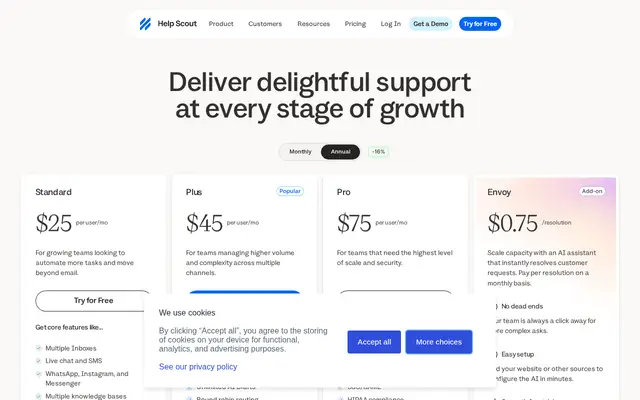
- Standard is $25, Plus $45 and Pro $75 per user a month when billed yearly (checked November 6, 2026). That works out to $300, $540 or $900 per user a year before extras and tax.
- Pro requires at least ten users, so $75 isn't the price of a one-person Pro account. All prices are in U.S. dollars.
- Extra inboxes are $10 a month billed yearly or $12 monthly, and extra Docs sites are $20 a month billed yearly or $24 monthly. AI Answers costs $0.75 per resolved conversation, billed monthly.
- Standard and Plus come with a 15-day trial with no card needed, and new accounts get a three-month AI trial. The Free plan includes five users, one inbox, one Docs site and a limited number of contacts each month. Tax and optional services are extra.
What We Like
- Pricing is clear, and the billing guide explains what you pay for.
- A 30-day money-back guarantee on your first payment, monthly or yearly.
- The docs explain per-user billing, AI resolutions and extra capacity before you sign up.
What to Watch Out For
- Listed prices are per user per month billed yearly, and Pro has a minimum number of users.
- Help Scout can use de-identified data to train models unless you ask to opt out.
- Canceling can deactivate your account but still leave you owing the full term.
The Fine Print
- The 30-day money-back guarantee applies to your first payment. After that, partial months and unused time generally aren't refunded or credited.
- Plans renew automatically for the same term unless you give written notice at least 30 days before they end. Canceling doesn't erase fees for the rest of your term.
- After cancellation, you have 14 days to ask in writing to restore your account; after that it can't be recovered, so export your records first.
- You keep your data rights. Help Scout's terms allow de-identified training data with an opt-out by request, and BAA customers are opted out automatically. Health data needs the right plan and a BAA.
Who It’s Best For
Shared Inbox And Public Help Center Teams.
- Teams that answer customer emails together and want shared ownership, saved replies and searchable history.
- Small businesses moving away from a shared email login.
Who Should Skip It
- Not for teams that need a complex IT service desk or broad multi-channel routing.
The Main Alternative
Zendesk Checked by Vetteroo
Zendesk, which we've also reviewed, suits teams that need more channels and a larger service platform. Help Scout is built more around the inbox. Compare seats, the yearly commitment, AI costs and the integrations you need.
What it costs: $19/agent/month billed yearly (Support Team)
Read our Zendesk review.
Is It Right for You?
Pick Help Scout If You…
- want a shared inbox and help center and the yearly per-user cost works for you.
- can manage AI spending, data permissions and the written renewal notice.
Pick Zendesk If You…
- need more channels or a different admin setup.
- can't work with the advance renewal notice or Help Scout's data-use terms.
Our Take
Help Scout is a well-designed shared inbox and help center for support teams, with clear pricing and a 30-day money-back guarantee on your first payment. Prices are per user and billed yearly, plans renew automatically unless you give written notice, and AI resolutions cost extra, so budget for the full term.
Our review is a starting point, not the last word. Before you decide, see Help Scout’s own plan details and terms on its official site.
Side by Side
| Company | Best for | Starting price | Trial / refund |
|---|---|---|---|
| Help Scout Checked by Vetteroo | Shared Inbox And Public Help Center Teams | $25/User/Month Equivalent; Annual Standard | First Payment30-Day Guarantee; Then General Nonrefund Rules |
| Zendesk Checked by Vetteroo | Administered Multichannel Customer Service | $19/agent/month billed yearly (Support Team) | Generally Nonrefundable;30-Day Written Nonrenewal Notice |
Prices can change often. Check official pages for current prices.
What We Checked
- Help Scout's pricing, product pages and terms, read November 7, 2026
- Trustpilot, searched November 7, 2026 (no usable score for Help Scout)
- Zendesk's details: from our published review and its official pages, November 7, 2026
- The other official and outside pages listed under Sources (links checked November 7, 2026)
How We Researched
We researched Help Scout's official pricing, terms, product pages, help pages and outside reviews. We haven't used Help Scout ourselves, so this is a research-based review, not a hands-on test.
More in Customer Support Software
See All Reviews →- Collect.chat Vetteroo Our Pick
- Provide Support Vetteroo Our Pick
- BoldDesk Checked by Vetteroo
- BotPenguin Checked by Vetteroo
- Botpress Checked by Vetteroo
- Calilio Checked by Vetteroo
- Canny Checked by Vetteroo
- Chaport Checked by Vetteroo
Also in Small-Business Tools.
Ready to Try Help Scout?
- 30-day money-back guarantee
- $25/User/Month Equivalent; Annual Standard
Confirm the latest terms on the official site before you buy.
How We Review
We read the company's own terms, test the sign-up or booking steps where we can, and compare it with alternatives. A commission never changes what we write. Read our disclosure.