
Quick Review:
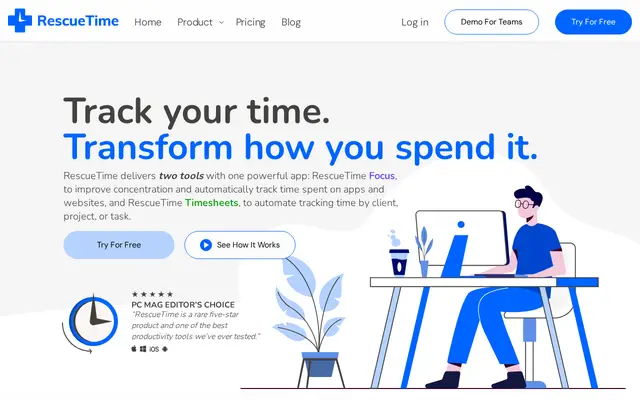
RescueTime tracks how you spend time on your devices to help you understand your work habits. It can show you where your time goes, but it can't judge the quality of your work.
- Best For
- Understanding personal focus or reviewing project time.
- Skip It If
- Employers wanting secret monitoring or anyone seeking a treatment for attention problems.
- Starting Price
- Solo Focus $9 monthly or $84 annuallyChecked November 6, 2026.
Top 3 Pros
- The pricing page shows both yearly totals and monthly options.
- Solo Focus and the timesheet bundle are clearly separated.
- Pause controls, tracking schedules and privacy settings are listed up front.
Top 3 Cons
- Screen activity misses offline work and doesn't measure quality.
- Suggested timesheets still need checking before you bill a client.
- Yearly billing is paid up front, and canceling usually doesn't refund unused time.
Deep Dive:
What It Is
Automatic activity tracking and focus tools, with a separate timesheet bundle for organizing work by client, project and task
How It Works
A useful day starts by deciding what should count as focused work, then reviewing whether the recorded activity reflects that intention. A website categorized as distracting could be necessary research for one task, while a productive-looking app can still be used without progress. The timesheet bundle adds another step: allocating work to the right client or project and reviewing suggestions before finalizing a billable record. This is a proposed evaluation based on the listed tools, not a productivity experiment we conducted or a claim that the software makes every hour billable.
Seen on RescueTime’s own product pages, help center and documentation, read November 6, 2026 (listed under Sources). We haven’t used RescueTime ourselves.
Key Features
- Automatic Activity Tracking With Idle Detection
- Pause Tracking And Logging Schedules
- Focus Sessions, Goals And Alerts
- Plan-Dependent Personal And Team Reports
- Timesheet Suggestions And Project Organization In The Bundle
Setup & Learning Curve
Define the personal goal and privacy boundary before installing a tracker. Decide which hours should be logged, which websites or applications need special handling, and who can view reports in a team environment. A team should communicate its rules and obtain any required permissions rather than relying on a software subscription to settle workplace privacy questions. We installed nothing, connected no work account and recorded no activity. A focus score should be one input to a conversation, not a substitute for assessing the actual quality and purpose of someone’s work. Before Committing: A future authorized trial should use a representative but non-sensitive workday and compare recorded time against a simple personal note. Check idle detection, pauses, mistaken classifications and what another team role can see. For Timesheets, inspect whether client and project assignments are correct before considering an invoice. Retain the selected billing term and trial end date. Do not start tracking colleagues or connect employer data merely because a trial is available.
Integrations
The pricing comparison lists calendar and work-tool connections including Gmail/Outlook, Asana, Slack and GitHub, alongside export and API access. Availability needs to be checked for the selected Focus or Timesheets plan rather than inferred from a logo elsewhere on the page. An integration also changes what work information can be processed and which permissions are granted. No inbox, task system, repository or calendar was connected. Exports can help with an independent record, but exported activity is not automatically an approved payroll or client-billing document.
Support
The official site publishes support, security and privacy resources and detailed English terms. The terms describe the service as available without an unconditional accuracy or uninterrupted-availability warranty. Promotional invitations to become more productive are not independent outcome measurements. We did not measure support response, blocking effectiveness or productivity change, and no medical benefit is asserted. For a team evaluating deployment, the important evidence is an appropriate privacy configuration and a review process, not a claim that a dashboard objectively ranks employee value.
Real-World Use Cases
- Examining Personal Attention Patterns Without Treating Scores As A Diagnosis
- Comparing Planned Work With Recorded Digital Activity
- Reviewing Suggested Project Time Before Client Billing
What It Costs
Solo Focus $9 Monthly Or $84 Annually, checked November 6, 2026
Prices checked November 6, 2026, from RescueTime’s own pricing page unless noted. Prices change often, so check the official page before you buy.
Check current pricing and plans on RescueTime’s official site →
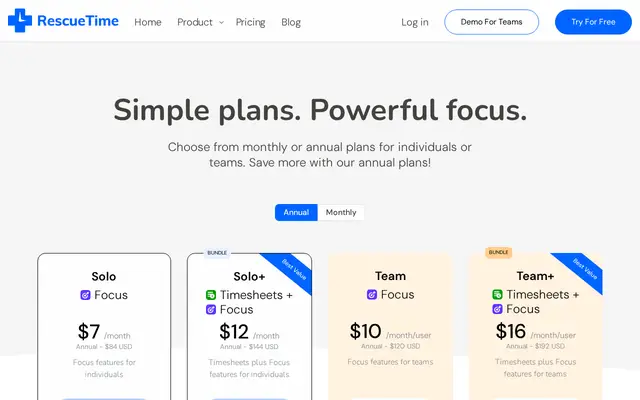
- The official USD pricing page checked November 6, 2026 lists Solo Focus at $9 monthly or $84 annually, described as a $7 monthly equivalent. Solo+ adds Timesheets at $15 monthly or $144 annually, a $12 monthly equivalent. The annual figures are stated invoices, not twelve independently cancelable monthly purchases.
- Team Focus is $12 per user monthly or $120 per user annually; Team+ is $18 per user monthly or $192 per user annually. The published annual equivalents are $10 and $16 per user per month. These are different products and billing units: a solo price should not be presented as the cost of an entire team.
- All paid plans are advertised with a fourteen-day trial, with no charge until it ends and cancellation before then to avoid billing. The page says credit/debit cards and PayPal are accepted, and invoice billing is available for teams of at least 100 users. No temporary discount or current coupon is invented. Official facts checked November 6, 2026.
What We Like
- The pricing page shows both yearly totals and monthly options.
- Solo Focus and the timesheet bundle are clearly separated.
- Pause controls, tracking schedules and privacy settings are listed up front.
What to Watch Out For
- Screen activity misses offline work and doesn't measure quality.
- Suggested timesheets still need checking before you bill a client.
- Yearly billing is paid up front, and canceling usually doesn't refund unused time.
The Fine Print
- The paid trial lasts 14 days, and canceling before it ends means you won't be billed. After that, you can cancel in account settings and keep premium access until the end of the cycle.
- Prorated refunds aren't usually offered; contact support about billing errors.
- The terms include individual arbitration and limits on liability.
Who It’s Best For
Understanding Personal Focus Or Reviewing Project Time.
- People who want a record of their screen time to improve their own habits.
- Freelancers who know activity data isn't the same as an approved client timesheet.
Who Should Skip It
- Not for employers wanting secret monitoring or anyone seeking a treatment for attention problems.
The Main Alternative
Toggl Track
Toggl Track, which we've also reviewed, is better if you want to log project time on purpose rather than track activity automatically. Compare how entries are created, edited, approved and exported, and what a manager can see.
What it costs: No New Competitor Price Quoted
Is It Right for You?
Pick RescueTime If You…
- want to see where your screen time goes and will think critically about the results.
- can set a clear personal or team tracking and privacy boundary.
Pick Toggl Track If You…
- only need a simple project timer.
- can't agree on how much monitoring is appropriate.
Our Take
RescueTime tracks how you spend time on your devices to help you understand your work habits. It can show you where your time goes, but it can't judge the quality of your work. Choose a plan based on whether you need Focus or Timesheets and how many users, and set clear privacy rules before tracking anyone else.
Our review is a starting point, not the last word. Before you decide, see RescueTime’s own plan details and terms on its official site.
Side by Side
| Company | Best for | Starting price | Trial / refund |
|---|---|---|---|
| RescueTime Checked by Vetteroo | Understanding Personal Focus Or Reviewing Project Time | Solo Focus $9 Monthly Or $84 Annually | 14-Day Trial; No Typical Prorated Refund |
| Toggl Track | Compare The Actual Time-Tracking Workflow | No New Competitor Price Quoted | Read Applicable Current Product Terms |
Prices can change often. Check official pages for current prices.
What We Checked
- RescueTime's pricing, product pages and terms, read November 6, 2026
- Trustpilot, searched November 6, 2026 (no usable score for RescueTime)
- Toggl Track's details: read on its official pages on November 6, 2026 (comparison only; not reviewed)
- The other official and outside pages listed under Sources (links checked November 6, 2026)
How We Researched
We researched RescueTime's official pricing, terms, product pages, help pages and outside reviews. We haven't used RescueTime ourselves, so this is a research-based review, not a hands-on test.
More in Productivity Apps
See All Reviews →Or start with our Best Project Management Software guide.
- monday.com Vetteroo Our Pick
- YouCanBook.me Vetteroo Our Pick
- AhaSlides Checked by Vetteroo
- Akiflow Checked by Vetteroo
- Appointlet Checked by Vetteroo
- Asana Checked by Vetteroo
- AudioPen Checked by Vetteroo
- Beautiful.ai Checked by Vetteroo
Ready to Try RescueTime?
- Solo Focus $9 Monthly Or $84 Annually
How We Review
We read the company's own terms, test the sign-up or booking steps where we can, and compare it with alternatives. A commission never changes what we write. Read our disclosure.