
Quick Review:
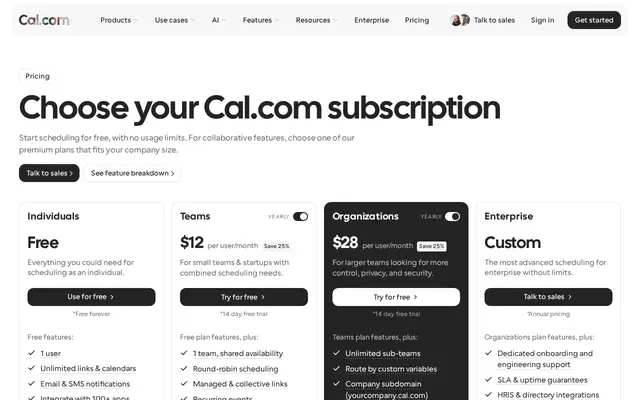
Cal.com is a strong scheduling option with a useful free plan for individuals and clear yearly team pricing.
- Best For
- Individuals and teams managing appointment links.
- Skip It If
- Anyone who needs every calendar and video tool to work exactly the same way.
- Starting Price
- Free Individual; Teams $12/user/month billed yearlyChecked November 6, 2026.
- Free Plan or Trial
- The free plan is for one user, with unlimited event links and calendar connections.
Top 2 Pros
- Team prices are clearly marked as billed yearly.
- You can test a real booking to see if it fits your calendar setup.
Top 3 Cons
- Paying yearly is a bigger commitment than the monthly figure suggests.
- Some integrations and support issues depend on the provider.
- Self-hosting needs its own technical and licensing review.

Deep Dive:
What It Is
A scheduling platform for sharing booking links, managing availability and coordinating individual or team appointment workflows
How It Works
The practical workflow begins with calendar availability, buffers and the type of appointment being offered. A guest should see a clear time zone, duration and confirmation. The owner then checks that the event reached the correct calendar and that changes propagate properly. The booking link reduces coordination work, but it does not remove the need to handle exceptions, missed connections or a calendar that has stopped syncing.
Seen on Cal.com’s own product pages, help center and documentation, read November 6, 2026 (listed under Sources). We haven’t used Cal.com ourselves.
Key Features
- Individual Booking Links
- Calendar Connections
- Team Scheduling Options
- Availability And Event Configuration
- Plan-Dependent Organization Controls
Setup & Learning Curve
Create one low-risk event type and check duration, buffers, notice periods and time-zone presentation. Connect only the calendars necessary for conflict detection and decide who can change team availability. Test a booking, reschedule and cancellation before sharing the link publicly. Keep a manual contact path for guests who cannot use the booking interface, and confirm payment and conferencing connections separately. Before Committing: Use a sample event spanning two time zones and an already busy calendar. Verify the guest confirmation, calendar entry, meeting location, reschedule and cancellation. Check what happens when an integration is disconnected. No calendar was connected and no appointment or invitation was created for this research.
Integrations
Calendar and video integrations are central to the experience, but account permissions and provider limitations matter. Public feedback includes Exchange and Teams connection concerns. Verify the exact provider and authentication setup your organization uses rather than assuming a general logo proves the required enterprise configuration works.
Support
Users commonly praise the approachable scheduling interface and flexibility, while other reports raise support delays, billing and integration problems. Hosted service and self-hosting feedback should not be mixed: installation and licensing concerns in a self-managed deployment do not automatically describe the hosted subscription. We did not book an appointment or measure sync reliability.
Real-World Use Cases
- Offering A Standard Consultation Slot
- Coordinating Team Appointment Availability
- Reducing Repetitive Time-Selection Messages
What It Costs
Free Individual; Teams $12/User/Month Billed Yearly, checked November 6, 2026
Prices checked November 6, 2026, from Cal.com’s own pricing page unless noted. Prices change often, so check the official page before you buy.
Check current pricing and plans on Cal.com’s official site →
- The free plan is for one user, with unlimited event links and calendar connections. Teams is $12 per user a month and Organizations $28 per user a month, both billed yearly.
- Paid plans have a 14-day trial, and Enterprise is priced by contract. Payment processors may charge their own fees (checked November 6, 2026).
What We Like
- A free individual plan with unlimited event links and calendar connections.
- Team prices are clearly marked as billed yearly.
- You can test a real booking to see if it fits your calendar setup.
What to Watch Out For
- Paying yearly is a bigger commitment than the monthly figure suggests.
- Some integrations and support issues depend on the provider.
- Self-hosting needs its own technical and licensing review.
The Fine Print
- Plans renew automatically, and canceling takes effect at the end of the paid period.
- Paid fees are generally non-refundable unless the law or an agreement says otherwise, and closing your account doesn't cancel what you owe.
- Cal.com needs your express permission before charging when a trial converts. Check your plan, trial end date and renewal schedule.
Who It’s Best For
Individuals And Teams Managing Appointment Links.
- People who want an easy way to share available appointment times.
- Teams that can set clear calendar permissions, routing and ownership.
Who Should Skip It
- Not for anyone who needs every calendar and video tool to work exactly the same way.
The Main Alternative
Calendly
Calendly, which we've also reviewed, is another popular scheduling tool. Test the same event type, calendar and team routing in both, since similar features can have different plan limits.
What it costs: Free; Standard $10/seat/mo yearly ($12 monthly), checked October 30, 2026
Is It Right for You?
Pick Cal.com If You…
- want a free individual plan or can justify the yearly team cost.
- will test your exact calendar and video setup before sharing booking links.
Pick Calendly If You…
- already have a Calendly setup that works for your team.
- prefer how Calendly handles the same booking test.
Our Take
Cal.com is a strong scheduling option with a useful free plan for individuals and clear yearly team pricing. What matters most is whether it works with your calendars and booking process, so test a full booking from start to finish before moving your team to a paid year.
Our review is a starting point, not the last word. Before you decide, see Cal.com’s own plan details and terms on its official site.
Side by Side
| Company | Best for | Starting price | Trial / refund |
|---|---|---|---|
| Cal.com Checked by Vetteroo | Individuals And Teams Managing Appointment Links | Free Individual; Teams $12/User/Month Billed Yearly | 14-Day Paid-Plan Trial; Fees Generally Non-Refundable |
| Calendly | Teams that want the most widely used booking-link tool | Free; Standard $10/seat/mo yearly ($12 monthly), checked October 30, 2026 | Free plan |
Prices can change often. Check official pages for current prices.
What We Checked
- Cal.com's pricing, product pages and terms, read November 6, 2026
- Cal.com's Trustpilot profile, read November 6, 2026
- Calendly's details: read on its official pages on November 6, 2026 (comparison only; not reviewed)
- The other official and outside pages listed under Sources (links checked November 6, 2026)
How We Researched
We researched Cal.com's official pricing, terms, product pages, help pages and outside reviews. We haven't used Cal.com ourselves, so this is a research-based review, not a hands-on test.
More in Scheduling & Calendar Apps
See All Reviews →- SimplyBook.me Vetteroo Our Pick
- YouCanBook.me Vetteroo Our Pick
- Akiflow Checked by Vetteroo
- Appointlet Checked by Vetteroo
- Calendesk Checked by Vetteroo
- Doodle Checked by Vetteroo
- Lunacal Checked by Vetteroo
- Morgen Checked by Vetteroo
Ready to Try Cal.com?
- Free Individual; Teams $12/User/Month Billed Yearly
How We Review
We read the company's own terms, test the sign-up or booking steps where we can, and compare it with alternatives. A commission never changes what we write. Read our disclosure.