
Quick Review:
Clockify is a practical time tracker once you know how many seats and which approval features you need. The best test is running a real timesheet-to-invoice cycle, not comparing feature lists.
- Best For
- Freelancers and teams that need project time records.
- Skip It If
- Anyone who expects time tracking to handle payroll, legal compliance or performance reviews.
- Starting Price
- Free up to 5 users; Basic $3.99/seat/month annuallyChecked November 6, 2026.
Top 3 Pros
- Free for teams of up to five users.
- A Pro trial with no card lets you test approvals and reports.
- Yearly, monthly, full-seat and kiosk-only billing are all clearly explained.
Top 3 Cons
- Every active and invited user takes a paid seat, including admins.
- A kiosk-only seat isn't a full mobile user.
- Reports are only as accurate as the time entries behind them.
Deep Dive:
What It Is
Time tracking, timesheets and paid billing, approval, scheduling and workforce-management features from CAKE.com
How It Works
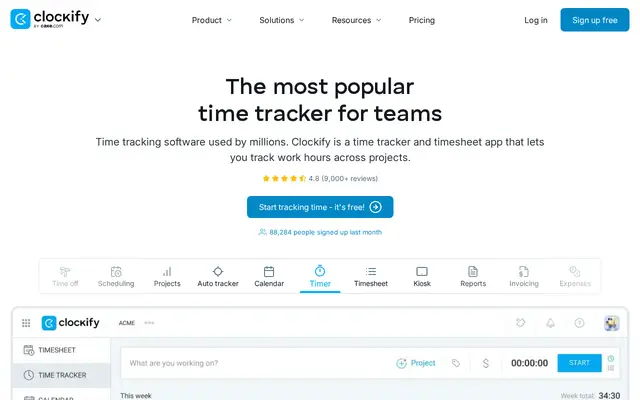
People start a timer or fill in a timesheet, assign entries to projects and review reports before billing. Managers on the appropriate plan can add approvals or lock completed periods. The quality of the report depends on consistent project codes and staff habits: a perfect-looking dashboard can still contain forgotten timers or misclassified work.
Seen on Clockify’s own product pages, help center and documentation, read November 6, 2026 (listed under Sources). We haven’t used Clockify ourselves.
Key Features
- Timer and manual timesheets
- Project time reports
- Mobile and desktop tracking
- Paid approvals and invoicing
- Separate kiosk seat model
Setup & Learning Curve
Define project names, billable rules and who corrects mistakes before inviting a team. Test with one billing cycle and compare exported time with the records you already trust. Explain optional monitoring features clearly to workers, get any required consent and avoid enabling location features merely because the product offers them. Before Committing: Have staff record the same representative tasks for a week, correct an accidental timer and approve a completed period. Export the result and reconcile it with an invoice or payroll input. Count owners, managers and invited members before calculating paid seats, and check whether any proposed kiosk user also needs mobile access.
Integrations
Clockify lists app integrations and calendar connections; Standard includes a QuickBooks integration. Check the exact application and plan you need. The presence of an integration does not prove its invoice fields, permissions and synchronization timing match your bookkeeping process.
Support
The pricing FAQ says support is available on all plans, with concierge support reserved for qualifying seat counts. We searched third-party software feedback but do not publish an aggregate rating here; validate reliability against your own time-entry and billing process.
Real-World Use Cases
- Client billing support
- Project budget reviews
- A small-team weekly timesheet process
What It Costs
Free up to 5 users; Basic $3.99/seat/mo annually, checked November 6, 2026
Prices checked November 6, 2026, from Clockify’s own pricing page unless noted. Prices change often, so check the official page before you buy.
Check current pricing and plans on Clockify’s official site →
- Free time tracking is offered for up to 5 users: the owner can invite up to 4 people. Do not assume older unlimited-user descriptions remain current.
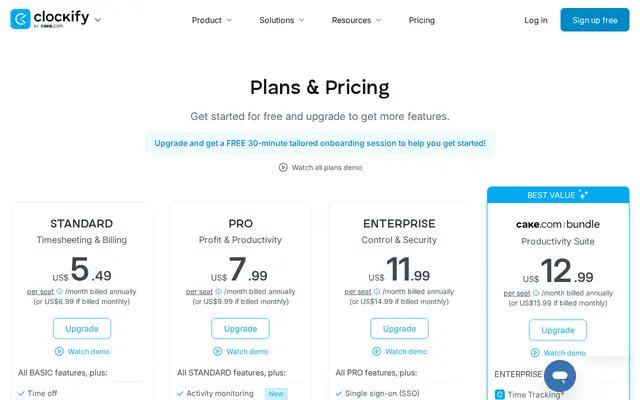
- Annual paid seat rates displayed were Basic $3.99, Standard $5.49, Pro $7.99 and Enterprise $11.99 per seat/month. The yearly term is paid in advance.
- The Standard card explicitly lists $6.99/seat/month for monthly billing. Limited kiosk-only seats have separate rates and are not equivalent to full mobile/app seats.
- A 7-day Pro trial requires no credit card. Taxes can be added where applicable. Official prices checked November 6, 2026.
What We Like
- Free for teams of up to five users.
- A Pro trial with no card lets you test approvals and reports.
- Yearly, monthly, full-seat and kiosk-only billing are all clearly explained.
What to Watch Out For
- Every active and invited user takes a paid seat, including admins.
- A kiosk-only seat isn't a full mobile user.
- Reports are only as accurate as the time entries behind them.
The Fine Print
- Clockify says it does not offer refunds except mistaken charges caused by system error.
- Cancellation stops later billing and downgrades to Free after the paid term; the FAQ says data is not lost solely because of cancellation.
- Yearly billing prepays the full seat-year; adding a seat mid-term produces a prorated charge.
- Employee privacy and labor rules remain the employer’s responsibility.
Who It’s Best For
Freelancers and teams that need project time records.
- Freelancers and small teams tracking time by client, project or task.
- Managers who need approvals and invoicing enough to pay for seats.
Who Should Skip It
- Not for anyone who expects time tracking to handle payroll, legal compliance or performance reviews.
The Main Alternative
Jibble Checked by Vetteroo
Jibble, which we've also reviewed, is another time and attendance tool. Compare project billing against clock-in attendance, how easy it is for employees and the paid features you need.
What it costs: Free; paid from $4.49/user/mo yearly per Timely (third party), as of October 29, 2026
Read our Jibble review.
Is It Right for You?
Pick Clockify If You…
- want project-based time records and reports alongside billing controls.
- have a small enough team to test the current free-user limit.
Pick Jibble If You…
- are primarily evaluating attendance and a clock-in workflow.
- already have a Jibble process that staff can use consistently.
Our Take
Clockify is a practical time tracker once you know how many seats and which approval features you need. The best test is running a real timesheet-to-invoice cycle, not comparing feature lists.
Our review is a starting point, not the last word. Before you decide, see Clockify’s own plan details and terms on its official site.
Side by Side
| Company | Best for | Starting price | Trial / refund |
|---|---|---|---|
| Clockify Checked by Vetteroo | Freelancers and teams that need project time records | Free up to 5 users; Basic $3.99/seat/mo annually | 7-day Pro trial; generally no refunds |
| Jibble Checked by Vetteroo | Teams that want free time tracking for any number of users | Free; paid from $4.49/user/mo yearly per Timely (third party), as of October 29, 2026 | Free plan |
Prices can change often. Check official pages for current prices.
What We Checked
- Clockify's pricing, product pages and terms, read November 6, 2026
- Trustpilot, searched November 6, 2026 (no usable score for Clockify)
- Jibble's details: from our published review and its official pages, November 6, 2026
- The other official and outside pages listed under Sources (links checked November 6, 2026)
How We Researched
We researched Clockify's official pricing, terms, product pages, help pages and outside reviews. We haven't used Clockify ourselves, so this is a research-based review, not a hands-on test.
More in Time Tracking & Employee Monitoring
See All Reviews →- ActivTrak Checked by Vetteroo
- Buddy Punch Checked by Vetteroo
- Connecteam Checked by Vetteroo
- DeskTime Checked by Vetteroo
- Hubstaff Checked by Vetteroo
- Insightful Checked by Vetteroo
- Jibble Checked by Vetteroo
- Mera Work Checked by Vetteroo
Ready to Try Clockify?
- A Pro trial with no card lets you test approvals and reports
- Free up to 5 users; Basic $3.99/seat/mo annually
Confirm the latest terms on the official site before you buy.
How We Review
We read the company's own terms, test the sign-up or booking steps where we can, and compare it with alternatives. A commission never changes what we write. Read our disclosure.