
Quick Review:
Gymdesk manages memberships, attendance and billing for gyms and martial arts schools, from $75 a month with its preferred payment processing or $100 with your own processor.
- Best For
- Gyms organizing membership, attendance and billing.
- Starting Price
- $75/month Micro with preferred processing; $100 with own processorChecked November 6, 2026.
Top 3 Pros
- Published active-member bands make the software cost understandable.
- Unlimited staff accounts avoid a simple per-employee subscription multiplier.
- The no-card trial allows workflows to be inspected before a paid software term.
Top 3 Cons
- The lower software rate depends on the processing route selected.
- Optional locations, apps, access control and processing can add meaningful costs.
- Automated billing still needs reconciliation and member-change procedures.
Deep Dive:
What It Is
Membership-management software for gyms and martial-arts businesses, combining member records, attendance, scheduling and billing workflows
How It Works
A staff member checks attendance and the day’s classes, then reviews membership status before a billing question becomes a dispute. The operator should inspect failed payments and changes in active-member counts rather than assume every automation completed correctly. At the end of the period, software reports need reconciliation with actual processor settlements. A central member record is useful only if staff know which system controls cancellations, freezes and customer communications.
Seen on Gymdesk’s own product pages, help center and documentation, read November 6, 2026 (listed under Sources). We haven’t used Gymdesk ourselves.
Key Features
- Member And Membership Records
- Class Scheduling And Attendance
- Recurring Billing Workflows
- Staff Access And Administration
- Plan-Dependent Optional App And Door Access
Setup & Learning Curve
Map the membership types, freeze rules and cancellation process before importing the entire roster. Test a small set of records with different statuses and verify which ones count as active. Assign staff roles deliberately, particularly where records concern children or payment information. Confirm the selected payment processor, settlement reporting and any separate processing commitment. Keep an export of the original member list and reconcile the first billing cycle before retiring an existing system. Before Committing: Create a non-sensitive sample roster containing an active member, a frozen member and a prospect. Inspect the billing count, attendance view and permissions, then compare a sample settlement report with the intended accounting process. Confirm how exports and cancellation work before migration. This review did not create members, process payments or test physical door access.
Integrations
Payment processing is a central commercial choice because it changes both the software rate and the operational settlement workflow. Door access and a branded app are separate optional decisions. Check what happens if a member freezes, a payment fails or the business changes processors. We did not connect a merchant account, import member information or attempt a charge.
Support
Current official terms describe subscription-holder support through the contact form, email and live chat, without establishing a response-time guarantee we have tested. Public reports include positive comments about management convenience alongside billing, check-in and app-access problems. Those reports support testing the actual operation, not declaring a uniform failure rate. Retain the chosen tariff and any processor agreement because a member-count headline is not a full payments contract.
Real-World Use Cases
- Maintaining A Single Membership Roster
- Coordinating Classes And Check-Ins
- Reconciling Recurring Membership Billing
What It Costs
$75/Month Micro With Preferred Processing; $100 With Own Processor, checked November 6, 2026
Prices checked November 6, 2026, from Gymdesk’s own pricing page unless noted. Prices change often, so check the official page before you buy.
Check current pricing and plans on Gymdesk’s official site →
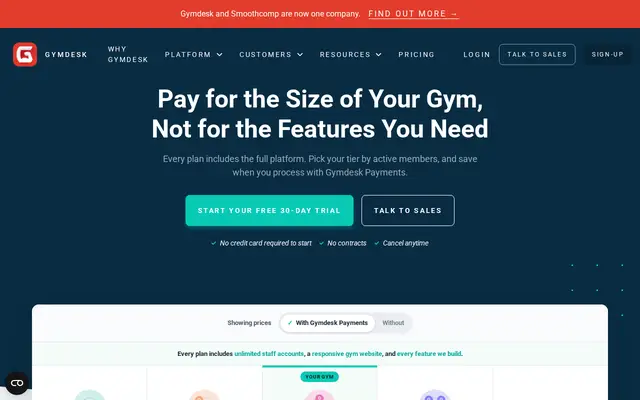
- Current USD pricing depends on active members and payment-processor choice. Micro, up to 50 active members, is $75 per month with Gymdesk Payments or a preferred partner and $100 with the business’s own processor. Small, 51–100 members, is $100 or $125; Medium, 101–150, is $150 or $175; Large, 151–250, is $200 or $240. Above 250 requires a quote.
- The page advertises all core features and unlimited staff accounts, with a 30-day no-card trial and month-to-month subscriptions. Visitors, prospects and frozen or cancelled members do not count as active members under the published explanation. Payment-processing charges are not made free by the software subscription.
- The first location is included; additional locations are $50 per month with the preferred processing route or $100 with the business’s own processor. Door-access beta, hardware and a branded app are optional costs, not included assumptions. The advertised branded app is $100 per month with its first month free. Official facts checked November 6, 2026.
What We Like
- Published active-member bands make the software cost understandable.
- Unlimited staff accounts avoid a simple per-employee subscription multiplier.
- The no-card trial allows workflows to be inspected before a paid software term.
What to Watch Out For
- The lower software rate depends on the processing route selected.
- Optional locations, apps, access control and processing can add meaningful costs.
- Automated billing still needs reconciliation and documented member-change procedures.
The Fine Print
- Paid software fees aren't refundable, and you pay for the full subscription term.
- There's no cancellation fee, but already-paid months aren't refunded. Your gym's own refund policy for members is separate.
- The branded app's first-month offer doesn't make later months, the main subscription or payment processing free. Export your records before ending access.
Who It’s Best For
Gyms Organizing Membership, Attendance And Billing.
- Gym and martial-arts operators needing consistent member and attendance records.
- Businesses able to reconcile recurring dues and control staff permissions.
Who Should Skip It
- Not a substitute for the operator’s payment policies, bookkeeping or privacy obligations.
The Main Alternative
Zen Planner
Zen Planner, which we've also reviewed, also manages fitness memberships. Compare member freezes, class attendance, billing and the payment processor each requires.
What it costs: No New Competitor Price Quoted
Is It Right for You?
Pick Gymdesk If You…
- need a dedicated membership and attendance workflow for a gym.
- will compare processor economics and reconcile member billing rather than focus only on the lowest software rate.
Pick Zen Planner If You…
- already have a reliable membership operation in Zen Planner.
- find that its specific attendance and billing workflow better fits the business after comparing the same scenarios.
Our Take
Gymdesk manages memberships, attendance and billing for gyms and martial arts schools, from $75 a month with its preferred payment processing or $100 with your own processor. Test freezes, failed payments and payout reports during setup. Software fees aren't refundable.
Our review is a starting point, not the last word. Before you decide, see Gymdesk’s own plan details and terms on its official site.
Side by Side
| Company | Best for | Starting price | Trial / refund |
|---|---|---|---|
| Gymdesk Checked by Vetteroo | Gyms Organizing Membership, Attendance And Billing | $75/Month Micro With Preferred Processing; $100 With Own Processor | 30-Day No-Card Trial; Software Fees Non-Refundable |
| Zen Planner | Compare The Specific Workflow; Not An Identical Product | No New Competitor Price Quoted | Read The Applicable Current Product Terms |
Prices can change often. Check official pages for current prices.
What We Checked
- Gymdesk's pricing, product pages and terms, read November 6, 2026
- Trustpilot, searched November 6, 2026 (no usable score for Gymdesk)
- Zen Planner's details: read on its official pages on November 6, 2026 (comparison only; not reviewed)
- The other official and outside pages listed under Sources (links checked November 6, 2026)
How We Researched
We researched Gymdesk's official pricing, terms, product pages, help pages and outside reviews. We haven't used Gymdesk ourselves, so this is a research-based review, not a hands-on test.
More in Small-Business Tools
See All Reviews →Or start with our Best Online Store Builders guide.
- Close Vetteroo Our Pick
- YouCanBook.me Vetteroo Our Pick
- 123FormBuilder Checked by Vetteroo
- ActiveCampaign Checked by Vetteroo
- Anymail Finder Checked by Vetteroo
- Asana Checked by Vetteroo
- BannerBuzz Checked by Vetteroo
- Baremetrics Checked by Vetteroo
Ready to Try Gymdesk?
- $75/Month Micro With Preferred Processing; $100 With Own Processor
How We Review
We read the company's own terms, test the sign-up or booking steps where we can, and compare it with alternatives. A commission never changes what we write. Read our disclosure.