
Quick Review:
Quo is a sensible small-team communications candidate, but carrier and usage charges matter. A trial on a temporary number is safer than moving the company’s main line before the workflow and terms are understood.
- Best For
- Small teams needing shared business calls and texts.
- Starting Price
- Starter $19/user/month or $180/user/yearChecked November 6, 2026.
Top 3 Pros
- Monthly prices and complete annual invoice totals are explicit.
- Shared conversations can reduce dependence on one person’s phone.
- The pricing page discloses carrier, extra-number and automated-message charges.
Top 3 Cons
- Per-user fees are only part of the total bill.
- US messaging registration and compliance take work.
- Internet connection quality and staff inbox habits affect the customer experience.
Deep Dive:
What It Is
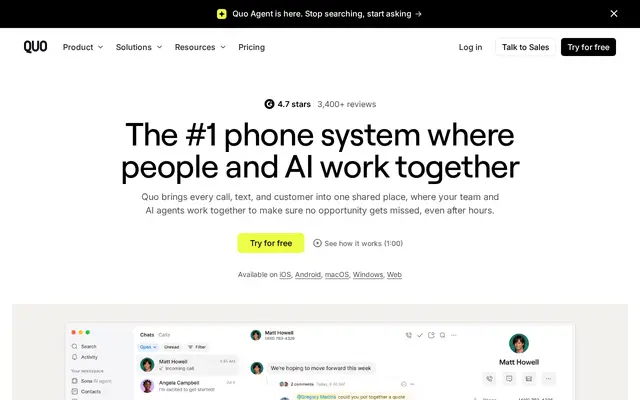
Quo, formerly OpenPhone: business calls, texts and shared team inboxes with optional AI call-handling features
How It Works
Staff use a business number and shared conversations rather than handing customers a personal line. The real benefit is continuity when a teammate is away: someone can see the context and respond. That only works if the team agrees on who owns an inbox, what gets recorded and when a customer should be escalated to a person.
Seen on OpenPhone (Quo)’s own product pages, help center and documentation, read November 6, 2026 (listed under Sources). We haven’t used OpenPhone (Quo) ourselves.
Key Features
- Shared calls and text conversations
- Local and toll-free business numbers
- Business and Scale call-handling features
- Optional AI call handling
- Automated messaging with separate usage charges
Setup & Learning Curve
Test with a new number rather than immediately porting the main line. Complete carrier registration legitimately, establish messaging consent and confirm that every staff member understands recording and retention settings. Test the actual network conditions of remote teammates; an internet calling app depends on that connection. Before Committing: Have two teammates handle the same test conversation, transfer a call, receive voicemail and follow up by text. Check what happens when neither person is available. Inspect carrier registration and message charges separately from the base subscription, and confirm that exporting records and porting a number away will meet the business’s requirements.
Integrations
The pricing page specifically mentions automated SMS through API, Zapier and Make, with separate outgoing-message fees. Verify the desired CRM or workflow connector and its plan requirement rather than assuming every integration shown in marketing is part of Starter.
Support
Official product and help resources should be used for number porting, carrier registration and AI configuration. Outside software-feedback results praised usability but also surfaced connectivity and bug reports. No current aggregate score is reproduced.
Real-World Use Cases
- Shared customer phone/text inbox
- Keeping a business number separate from personal calls
- Routing routine contacts while preserving human escalation
What It Costs
Starter $19/user/mo or $180/user/yr, checked November 6, 2026
Prices checked November 6, 2026, from OpenPhone (Quo)’s own pricing page unless noted. Prices change often, so check the official page before you buy.
Check current pricing and plans on OpenPhone (Quo)’s official site →
- Starter is $19/user/month or $180/user/year ($15/month equivalent). Business is $33/user/month or $276/year ($23/month equivalent). Scale is $47/user/month or $420/year ($35/month equivalent).
- The page lists a 7-day trial. USD prices exclude applicable taxes and fees.
- Each user gets one new local or toll-free number. Additional numbers are $5/month each; US carrier registration shows $19.50 one-time plus $1.50–$3/month messaging fees.
- Automated outgoing SMS through API, Zapier or Make is listed at $0.01/message; AI call-handling tiers and overages add separate costs. Official prices checked November 6, 2026.
What We Like
- Monthly prices and complete annual invoice totals are explicit.
- Shared conversations can reduce dependence on one person’s phone.
- The pricing page discloses carrier, extra-number and automated-message charges.
What to Watch Out For
- Per-user fees are only part of the total bill.
- US messaging registration and compliance take work.
- Internet connection quality and staff inbox habits affect the customer experience.
The Fine Print
- Quo's official subscription guide says payments already made are non-refundable; cancellation stops the next renewal and service continues until the billing period ends.
- Use Settings, Plan & billing, Cancel Subscription, confirm the cancellation and retain the confirmation email. The guide says phone numbers are held for at most 30 days after ordinary cancellation; arrange any port-out and export before closing.
- App-store subscriptions have separate Apple or Google billing controls. Adding seats mid-cycle is prorated immediately; removing a person does not remove the paid seat until renewal.
- Account suspension after failed payments has a shorter 14-day number-retention period. Do not treat cancellation as an instant port or guaranteed indefinite number storage.
Who It’s Best For
Small teams needing shared business calls and texts.
- Small businesses that need shared ownership of customer calls and texts.
- Teams willing to configure routing, staff access and messaging registration.
Who Should Skip It
- Not a replacement for every personal carrier, emergency-calling need or unrestricted international texting plan.
The Main Alternative
Grasshopper Checked by Vetteroo
Grasshopper, which we've also reviewed, is another business phone service. Compare shared messaging, team handoffs, registration fees and the number of users and phone numbers you need, not just the starting price.
What it costs: True Solo $14/mo billed annually; 7-day trial, checked October 26, 2026
Read our Grasshopper review.
Is It Right for You?
Pick OpenPhone (Quo) If You…
- want shared team conversations and have tested your messaging setup.
- can justify the full seat, number and usage bill.
Pick Grasshopper If You…
- mainly need a simpler business-number setup.
- already have a working Grasshopper process and do not need another shared inbox.
Our Take
Quo is a sensible small-team communications candidate, but carrier and usage charges matter. A trial on a temporary number is safer than moving the company’s main line before the workflow and terms are understood.
Our review is a starting point, not the last word. Before you decide, see OpenPhone (Quo)’s own plan details and terms on its official site.
Side by Side
| Company | Best for | Starting price | Trial / refund |
|---|---|---|---|
| OpenPhone (Quo) Checked by Vetteroo | Small teams needing shared business calls and texts | Starter $19/user/mo or $180/user/yr | 7-day trial; renewal and refund terms apply |
| Grasshopper Checked by Vetteroo | Solo owners and small teams who want a business number on their own phone | True Solo $14/mo billed annually; 7-day trial, checked October 26, 2026 | 7-day free trial; 7-day money-back guarantee |
Prices can change often. Check official pages for current prices.
What We Checked
- OpenPhone (Quo)'s pricing, product pages and terms, read November 6, 2026
- Trustpilot, searched November 6, 2026 (no usable score for OpenPhone (Quo))
- Grasshopper's details: from our published review and its official pages, November 6, 2026
- The other official and outside pages listed under Sources (links checked November 6, 2026)
How We Researched
We researched OpenPhone (Quo)'s official pricing, terms, product pages, help pages and outside reviews. We haven't used OpenPhone (Quo) ourselves, so this is a research-based review, not a hands-on test.
More in Remote Work Tools
See All Reviews →- monday.com Vetteroo Our Pick
- Anytime Mailbox Checked by Vetteroo
- CloudTalk Checked by Vetteroo
- Davinci Virtual Checked by Vetteroo
- DeskTime Checked by Vetteroo
- Fireflies.ai Checked by Vetteroo
- Getscreen.me Checked by Vetteroo
- Grasshopper Checked by Vetteroo
Ready to Try OpenPhone (Quo)?
- Starter $19/user/mo or $180/user/yr
Confirm the latest terms on the official site before you buy.
How We Review
We read the company's own terms, test the sign-up or booking steps where we can, and compare it with alternatives. A commission never changes what we write. Read our disclosure.