
Quick Review:
TidyCal is a simple booking tool with a free plan, one-time Lifetime deals from $29 and Pro at $12 a month or $99 a year. Features like calendar connections, team tools, branding and payment fees change by plan.
- Best For
- A booking page with clearly chosen calendar and team limits.
- Skip It If
- Anyone expecting a Lifetime deal to remove all branding, fees and limits.
- Starting Price
- Free; Pro $12/month or $99/year; Lifetime from $29Checked November 6, 2026.
- Money-Back or Refund
- The terms explain who pays platform fees and the refund window.
Top 2 Pros
- Free, one-time Lifetime and monthly or yearly Pro options.
- Clear yearly pricing.
Top 3 Cons
- Lifetime plans still show some branding and don't include Pro custom domains.
- Stripe processing fees apply even when TidyCal's fee is zero.
- Downgrading removes features right away.
Deep Dive:
What It Is
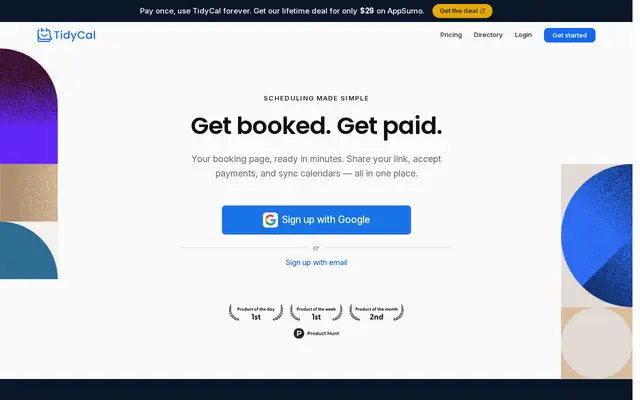
A booking-page service with a free plan, separately sold one-time Lifetime plans and a Pro subscription; paid-booking fees and calendar limits differ between those options
How It Works
A useful booking day begins with ensuring that the right calendars block availability, then presenting a booking type with the correct duration, location and cancellation rules. When a client books, the host should check the resulting event and meeting link rather than assuming every source calendar has synchronized correctly. If money changes hands, the host’s refund policy and processor charges are part of the workflow. This is a proposed evaluation, not a meeting booked or payment collected by Vetteroo. Software convenience does not settle whether a host is entitled to charge for a particular appointment.
Seen on TidyCal’s own product pages, help center and documentation, read November 6, 2026 (listed under Sources). We haven’t used TidyCal ourselves.
Key Features
- Unlimited Bookings And Booking Types On The Listed Free Plan
- Plan-Specific Calendar Connections With One Writable Calendar
- Collective And Round-Robin Team Booking On Higher Plans
- Paid Bookings, Packages And Recurring Booking Options
- Pro Custom Domains, Branding Removal And Priority Support
Setup & Learning Curve
Inventory calendars and determine which one should receive new events before connecting anything. The current comparison gives Free one readable calendar, Individual and Agency Lifetime ten, and Pro unlimited calendar connections, each with one writable calendar. Do not rely on an older three-calendar deal description. Choose whether a personal page or separate team page represents each brand. We created no account, bought no AppSumo deal, connected no calendar and entered no payment information. Terms restrict unauthorized commercial or competitive use, so intended business use should stay within the purchased plan and applicable permissions. Before Committing: A future authorized evaluation should use a dummy event and a non-sensitive booking type. Check time zones, buffers, conflicts across readable calendars, rescheduling and which calendar receives a new event. Verify automatic meeting links only on a plan that includes them. For paid bookings, inspect how the platform fee is displayed to the customer before taking real money. Do not run a paid transaction merely to test the site. Record the purchased plan, its invoice and its distinct refund rules rather than treating all products sold under the same brand alike.
Integrations
The comparison lists Google Calendar, Office 365 and Apple Calendar on all plans, with advanced connections such as Zoom, Teams and Zapier on paid options. API, MCP and webhooks are listed on every plan; this does not authorize an automated agent to schedule real people without consent. SMS reminders are limited to US/Canadian numbers, with ten monthly on Agency Lifetime and an unlimited description on Pro. Provider and carrier conditions still matter. A calendar connection, a payment-processor connection and a meeting-video account are separate permissions, and none was connected here.
Support
TidyCal identifies Sumo Group, Inc. in its English terms and publicly distinguishes priority support as a Pro feature. The pricing FAQ explains several practical limits instead of presenting Lifetime and Pro as identical. We did not measure response times, calendar reliability or message delivery, and carrier delivery is not guaranteed by the SMS clause. The word Lifetime describes a one-time plan’s billing model, not an independent guarantee that the provider will operate forever or maintain every future feature. Marketing comparisons with other schedulers were not adopted as performance evidence.
Real-World Use Cases
- Publishing A Basic Personal Availability Page
- Coordinating Eligible Team Hosts With Round-Robin Or Collective Booking
- Offering Paid Appointments With Clearly Communicated Host Refund Rules
What It Costs
Free; Pro $12/month or $99/year; Lifetime from $29, checked November 6, 2026
Prices checked November 6, 2026, from TidyCal’s own pricing page unless noted. Prices change often, so check the official page before you buy.
Check current pricing and plans on TidyCal’s official site →
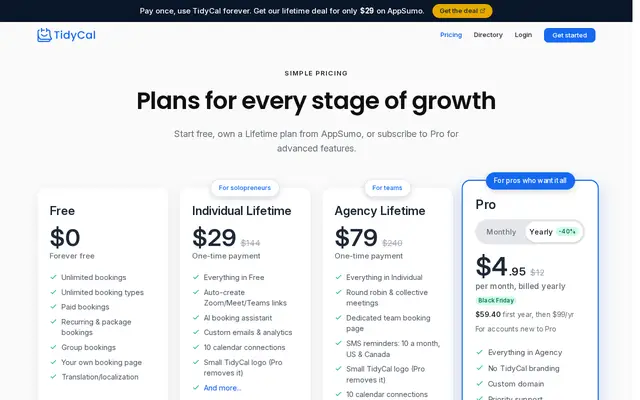
- Free is $0, Individual Lifetime is a one-time $29 and Agency Lifetime a one-time $79. Pro is $12 a month or $99 a year, about $8.25 a month (checked November 6, 2026).
- Lifetime deals were shown next to crossed-out prices of $144 and $240. Lifetime plans are sold through AppSumo and Pro on tidycal.com. Lifetime plans don't include every Pro feature.
- Free and Lifetime plans charge a 1% platform fee on Stripe payments, on top of Stripe's fees. Pro has no platform fee, though custom pricing may apply above $10,000 a month in sales.
What We Like
- Free, one-time Lifetime and monthly or yearly Pro options.
- Clear yearly pricing.
- The terms explain who pays platform fees and the refund window.
What to Watch Out For
- Lifetime plans still show some branding and don't include Pro custom domains.
- Stripe processing fees apply even when TidyCal's fee is zero.
- Downgrading removes features right away.
The Fine Print
- You can request a full Pro refund within seven days of purchase; after that, payments aren't refundable.
- Downgrading takes effect immediately and can turn off higher-tier features or integrations.
- Free and Lifetime plans charge a 1% platform fee on Stripe payments, on top of Stripe's own fees.
Who It’s Best For
A Booking Page With Clearly Chosen Calendar And Team Limits.
- Individuals who want people to book times without back-and-forth emails.
- Small teams needing collective or round-robin booking on the right plan.
Who Should Skip It
- Not for anyone expecting a Lifetime deal to remove all branding, fees and limits.
The Main Alternative
Calendly
Calendly, which we've also reviewed, is a popular booking tool. Compare calendar conflict checking, team booking options, branding and the full cost of paid bookings. TidyCal can import from Calendly, but not every setting may carry over.
What it costs: Free; Standard $10/seat/mo yearly ($12 monthly), checked October 30, 2026
Is It Right for You?
Pick TidyCal If You…
- pick the plan whose features you actually need.
- understand the platform and payment fees.
Pick Calendly If You…
- need team or integration features TidyCal's plans don't offer.
- want no branding and unlimited features from a one-time payment.
Our Take
TidyCal is a simple booking tool with a free plan, one-time Lifetime deals from $29 and Pro at $12 a month or $99 a year. Features like calendar connections, team tools, branding and payment fees change by plan. Pro refunds must be requested within seven days.
Our review is a starting point, not the last word. Before you decide, see TidyCal’s own plan details and terms on its official site.
Side by Side
| Company | Best for | Starting price | Trial / refund |
|---|---|---|---|
| TidyCal Checked by Vetteroo | A Booking Page With Clearly Chosen Calendar And Team Limits | Free; Pro $12/month or $99/year; Lifetime from $29 | Pro Refund Request Within 7 Days; Lifetime Purchase Terms Separate |
| Calendly | Teams that want the most widely used booking-link tool | Free; Standard $10/seat/mo yearly ($12 monthly), checked October 30, 2026 | Free plan |
Prices can change often. Check official pages for current prices.
What We Checked
- TidyCal's pricing, product pages and terms, read November 6, 2026
- Trustpilot, searched November 6, 2026 (no usable score for TidyCal)
- Calendly's details: read on its official pages on November 6, 2026 (comparison only; not reviewed)
- The other official and outside pages listed under Sources (links checked November 6, 2026)
How We Researched
We researched TidyCal's official pricing, terms, product pages, help pages and outside reviews. We haven't used TidyCal ourselves, so this is a research-based review, not a hands-on test.
More in Scheduling & Calendar Apps
See All Reviews →- SimplyBook.me Vetteroo Our Pick
- YouCanBook.me Vetteroo Our Pick
- Akiflow Checked by Vetteroo
- Appointlet Checked by Vetteroo
- Cal.com Checked by Vetteroo
- Calendesk Checked by Vetteroo
- Doodle Checked by Vetteroo
- Lunacal Checked by Vetteroo
Ready to Try TidyCal?
- The terms explain who pays platform fees and the refund window
- Free; Pro $12/month or $99/year; Lifetime from $29
How We Review
We read the company's own terms, test the sign-up or booking steps where we can, and compare it with alternatives. A commission never changes what we write. Read our disclosure.