
Quick Review:
ZoomShift handles shift scheduling and timesheets for hourly teams, with a free Essentials plan and Starter from $2.50 per user a month.
- Best For
- Hourly teams organizing shifts and time records.
- Starting Price
- Free plan; Starter $2.50/user/monthChecked November 6, 2026.
- Free Plan or Trial
- A free plan for small single-location teams.
Top 2 Pros
- Clear monthly and yearly pricing.
- Schedules and attendance in one place.
Top 3 Cons
- Paid spots can add up beyond your frontline headcount.
- Managers still need to review time corrections and payroll exports.
- Prepaid fees aren't refundable, and canceling can lose grandfathered pricing.
Affiliate link. How we get paid
What You’ll See on Their Site
Last Checked: 11/12/2026
Deep Dive:
What It Is
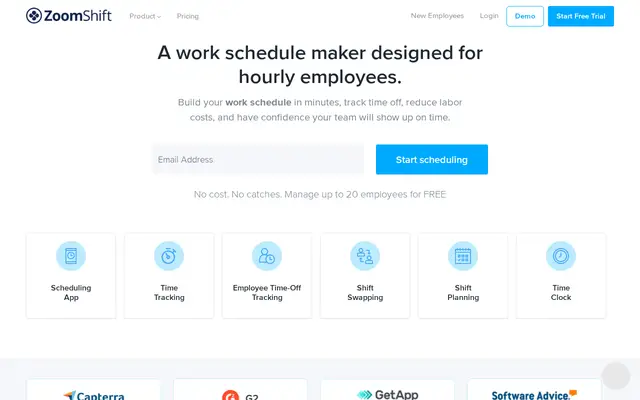
Employee scheduling and time-tracking software for hourly teams, combining shift planning, availability and attendance records
How It Works
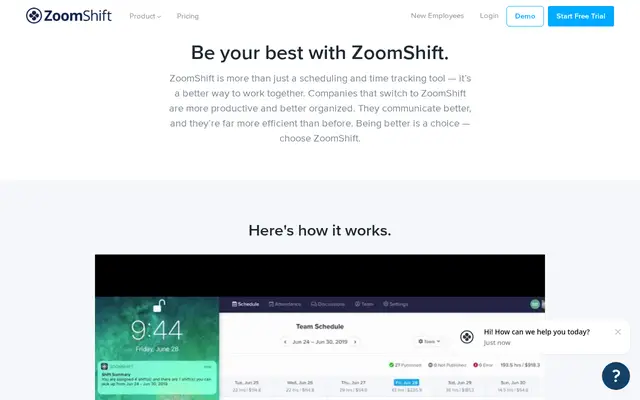
A manager builds the next schedule from availability and staffing needs, then employees check assigned shifts and request changes through the defined process. At the end of a shift or pay period, a responsible person reviews the recorded time and resolves exceptions. The value is a shared, auditable routine rather than an assumption that a time clock eliminates mistakes. A missed punch, swapped shift or incorrectly assigned person still requires a decision by the employer.
Seen on ZoomShift’s own product pages, help center and documentation, read November 6, 2026 (listed under Sources). We haven’t used ZoomShift ourselves.
Key Features
- Employee Shift Scheduling
- Availability And Time-Off Workflows
- Team Communication
- Time And Attendance Records
- Plan-Dependent Reporting And Administration
Setup & Learning Curve
Create one location and a small set of roles before inviting the full workforce. Enter the actual availability rules, establish who may publish schedules and define who approves time corrections. Check how managers count toward paid team-member spots rather than budgeting only for hourly staff. Test a shift crossing a date boundary, an absence and a requested swap. Keep the original payroll records until exports and approval procedures have been checked independently. Before Committing: Model an unavailable employee, an approved swap, a missing clock event and a corrected timesheet. Check what each person can see and who may approve the change. Compare the exported result with the original records and count every paid team-member spot. No employee account, payroll connection or attendance test was created for this research.
Integrations
Evaluate the handoff from the approved schedule to time records and then to the payroll process actually used by the employer. An exported timesheet is not proof that wage calculations, overtime or local rules are correct. Verify the required export format and any plan restriction before replacing a working process. We did not import employees, connect payroll or monitor a worker.
Support
Public feedback commonly praises approachable scheduling while also describing bugs, reporting limitations and uneven support experiences. These are themes from individual reports, not a reliability statistic. The official pricing FAQ is more useful than a directory for understanding billable spots and the distinction between monthly and annual rates. During evaluation, prioritize a real exception that your managers routinely handle rather than only a clean sample schedule.
Real-World Use Cases
- Publishing A Weekly Staff Schedule
- Reviewing Attendance Before Payroll
- Coordinating Availability And Shift Changes
What It Costs
Free plan; Starter $2.50/user/month, checked November 6, 2026
Prices checked November 6, 2026, from ZoomShift’s own pricing page unless noted. Prices change often, so check the official page before you buy.
Check current pricing and plans on ZoomShift’s official site → Affiliate link
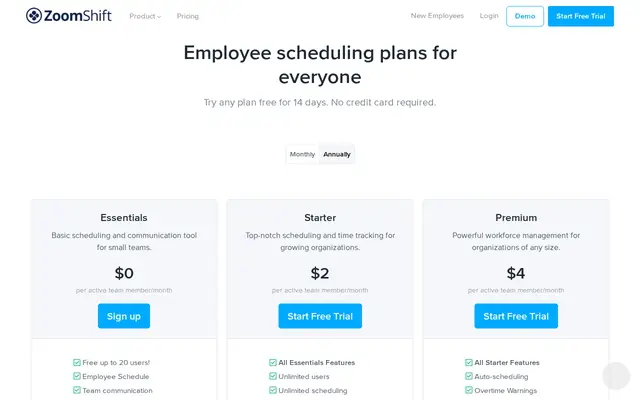
- Essentials is free for up to 20 users and one location. Starter is $2.50 per user per month on monthly billing or $2 per user per month equivalent with annual billing. Premium is $5 monthly or $4 per user per month equivalent annually. The official page labels monthly and annual figures separately.
- The advertised evaluation lasts 14 days without a credit card. Paid billing is based on active team-member spots, which can include managers as well as employees; the purchased quantity needs attention when staffing changes. The annual equivalents are not a newly verified annual invoice for an unspecified team. Official facts checked November 6, 2026.
Affiliate link. We may earn a commission at no extra cost to you. How we get paid
What We Like
- A free plan for small single-location teams.
- Clear monthly and yearly pricing.
- Schedules and attendance in one place.
What to Watch Out For
- Paid spots can add up beyond your frontline headcount.
- Managers still need to review time corrections and payroll exports.
- Prepaid fees aren't refundable, and canceling can lose grandfathered pricing.
The Fine Print
- Cancel in billing settings or through support. Prepaid fees aren't refunded, including partial months.
- There's no minimum term or cancellation fee.
- Canceling can end access to older pricing.
Who It’s Best For
Hourly Teams Organizing Shifts And Time Records.
- Small employers moving away from texting shifts and paper timesheets.
- Managers willing to keep availability, access and approval rules current.
Who Should Skip It
- Not a substitute for reviewing payroll or following employment laws.
The Main Alternative
Connecteam Vetteroo Our Pick
Connecteam, which we've also reviewed, manages frontline teams more broadly. Compare the same shift-change and time-approval process and the number of billable people.
What it costs: Free up to 10 users; hubs from $29/mo for 30 users, checked October 29, 2026
Read our Connecteam review.
Is It Right for You?
Pick ZoomShift If You…
- need a simple shared schedule for an hourly team.
- will approve time records before payroll.
Pick Connecteam If You…
- already use it for your frontline team.
- don't want two systems for staff communication.
Our Take
ZoomShift handles shift scheduling and timesheets for hourly teams, with a free Essentials plan and Starter from $2.50 per user a month. It works well when managers keep availability and approvals up to date. Check your timesheets before payroll, and know that prepaid fees aren't refunded.
Our review is a starting point, not the last word. Before you decide, see ZoomShift’s own plan details and terms on its official site. Affiliate link
Side by Side
| Company | Best for | Starting price | Trial / refund |
|---|---|---|---|
| ZoomShift Checked by Vetteroo | Hourly Teams Organizing Shifts And Time Records | Free plan; Starter $2.50/user/month See Price (affiliate link) | 14-Day No-Card Trial; Paid Fees Non-Refundable |
| Connecteam Vetteroo Our Pick | Field and shift-based teams that run time tracking and scheduling from phones | Free up to 10 users; hubs from $29/mo for 30 users, checked October 29, 2026 | 14-day free trial, no card |
Prices can change often. Check official pages for current prices.
What We Checked
- ZoomShift's pricing, product pages and terms, read November 6, 2026
- Trustpilot, searched November 6, 2026 (no usable score for ZoomShift)
- Connecteam's details: from our published review and its official pages, November 6, 2026
- The other official and outside pages listed under Sources (links checked November 6, 2026)
How We Researched
We researched ZoomShift's official pricing, terms, product pages, help pages and outside reviews. We haven't used ZoomShift ourselves, so this is a research-based review, not a hands-on test.
More in Time Tracking & Employee Monitoring
See All Reviews →- ActivTrak Checked by Vetteroo
- Buddy Punch Checked by Vetteroo
- Clockify Checked by Vetteroo
- Connecteam Checked by Vetteroo
- DeskTime Checked by Vetteroo
- Hubstaff Checked by Vetteroo
- Insightful Checked by Vetteroo
- Jibble Checked by Vetteroo
Ready to Try ZoomShift?
- A free plan for small single-location teams
- Free plan; Starter $2.50/user/month
Confirm the latest terms on the official site before you buy.
Affiliate link. We may earn a commission at no extra cost to you. How we get paid
How We Review
We read the company's own terms, test the sign-up or booking steps where we can, and compare it with alternatives. A commission never changes what we write. Read our disclosure.